
Trips & Dispatch
The operational pages for assigning vehicles, tracking trips and managing fleet availability in Taxi CRM 2026.
The Trips & Dispatch area is where dispatchers and fleet operators run day-to-day
operations: working the live dispatch board, assigning drivers and allotting vehicles to
bookings, tracking pickup/drop SMS, managing recurring, auto-assigned and cancelled trips, and
seeing which vehicles are free or locked. These screens are spread across the sidebar's
Current Status, Trips Booking, Follow Up, Summary and Payments categories;
this page gathers the operational ones in one place — bookingPlanner.html,
assignAllot.html, pickupDrop.html, regularTrips.html, autoAssignedBookings.html,
freeVehicle.html, cancelledTrips.html, dispatcherWise.html and lockVehicle.html.
Most pages in this group are built the same way: a sticky page header, an optional
hidden multi-criteria search panel (#show_multiple_filter_div, toggled from the header
and populated into #append_col), and a single DataTables grid (#initDataTable) inside a
card panel. (Booking Planner is the exception — it stacks several auto-height tables instead.)
Because they share that skeleton, customizing one is mostly a matter of editing
its column list and its page script under assets/js/pages/. See Tables
for how the grid, search and export controls are wired, and Layout for
the panel/row structure.
Booking Planner (bookingPlanner.html)
The live dispatch board (page subtitle Current Status) — what needs attention right now,
split into six time-bucketed tables across two columns so dispatchers can work the queue by
urgency. Unlike the other pages here it has no filter panel and no single grid; each bucket is
its own auto-height table (dt-wrapper-auto-height) that sizes to its rows rather than
paginating.
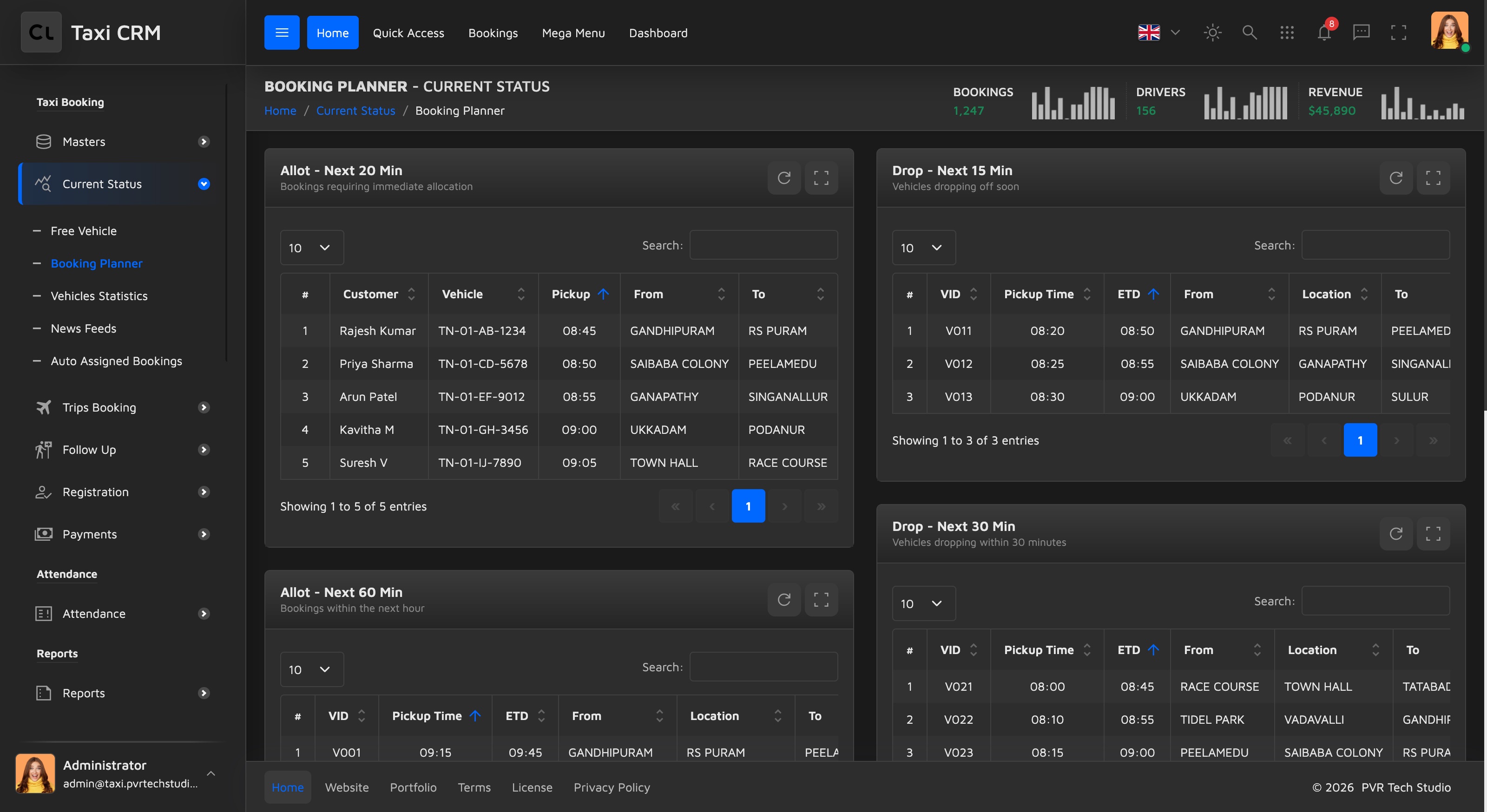
- Allot (left column) — bookings still needing a vehicle: Next 20 Min (
#allot20Table), Next 60 Min (#allot60Table), More Than 60 Min (#allotMore60Table). - Drop (right column) — vehicles about to free up: Next 15 Min (
#drop15Table), Next 30 Min (#drop30Table), Next 60 Min (#drop60Table).
The Allot tables carry columns like Customer, Vehicle / Taxi-Type, Pickup, From and To; the Drop tables show VID, Pickup Time, ETD, From, Location and To.
Customize: The buckets, table data and refresh are driven by
assets/js/pages/bookings/bookingPlanner.js (which calls the mock-API endpoints
getAllot20 / getAllot60 / getAllotMore60 and getDrop15 / getDrop30 / getDrop60).
Add or remove a bucket by copying a panelCard block and giving its table a new id; adjust
columns in the matching thead.
Assign & Allot (assignAllot.html)
The dispatcher's primary work queue: a list of booked trips that still need a driver assigned
and a vehicle allotted. Used by dispatchers and operations staff to turn confirmed bookings
into live trips. Page subtitle is Trips Booking; the script is
assets/js/pages/bookings/assignAllot.js (with shared demo data from
assets/js/pages/shared/data.js).
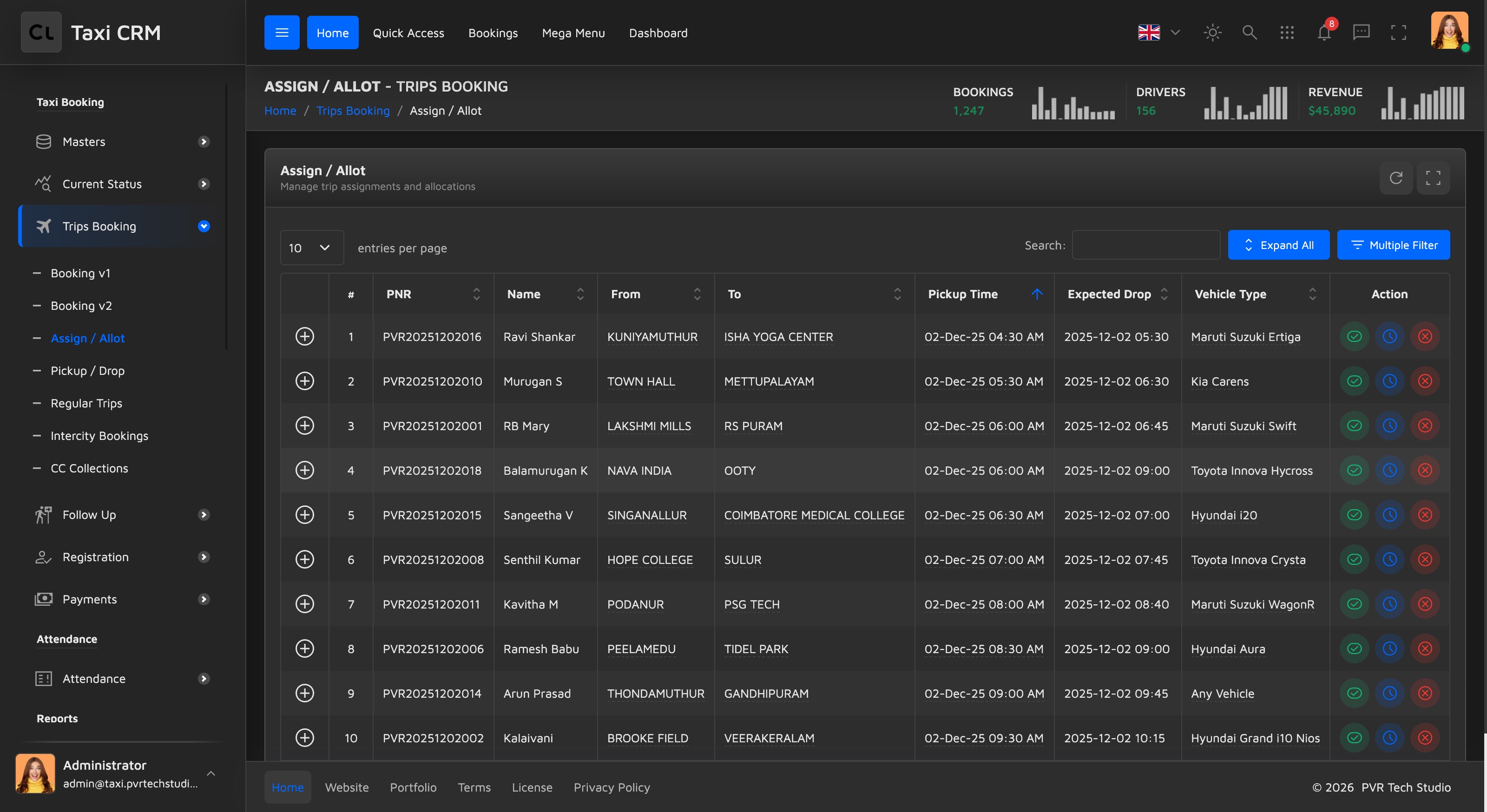
Grid columns:
| Column | Notes |
|---|---|
# | Row index |
| PNR | Booking reference (searchable) |
| Name | Passenger name (searchable) |
| From | Pickup location (searchable) |
| To | Drop location (searchable) |
| Pickup Time | Scheduled pickup (searchable) |
| Expected Drop | Estimated drop time (searchable) |
| Vehicle Type | Filterable via a column select |
| Action | Assign driver / allot vehicle controls |
The hidden Assign / Allot Search panel lets staff narrow the queue by multiple criteria
before acting. Searchable text columns carry the .apply_search class and the Vehicle Type
column uses .apply_select to render a dropdown filter.
Customize: the assignment workflow lives in assignAllot.js — wire the Action column
buttons to your real assign/allot endpoints and replace shared/data.js with live booking
data. Add or remove columns in the thead, keeping the .apply_search / .apply_select
classes consistent with the data rows.
Dispatcher-Wise (dispatcherWise.html)
A performance summary that rolls up booking and dispatch activity per dispatcher over a
period. Used by supervisors and managers to compare team members. Page subtitle is Summary;
the script is assets/js/pages/reports/dispatcherWise.js (note this one lives under
reports/, since it is a report rather than a booking action).
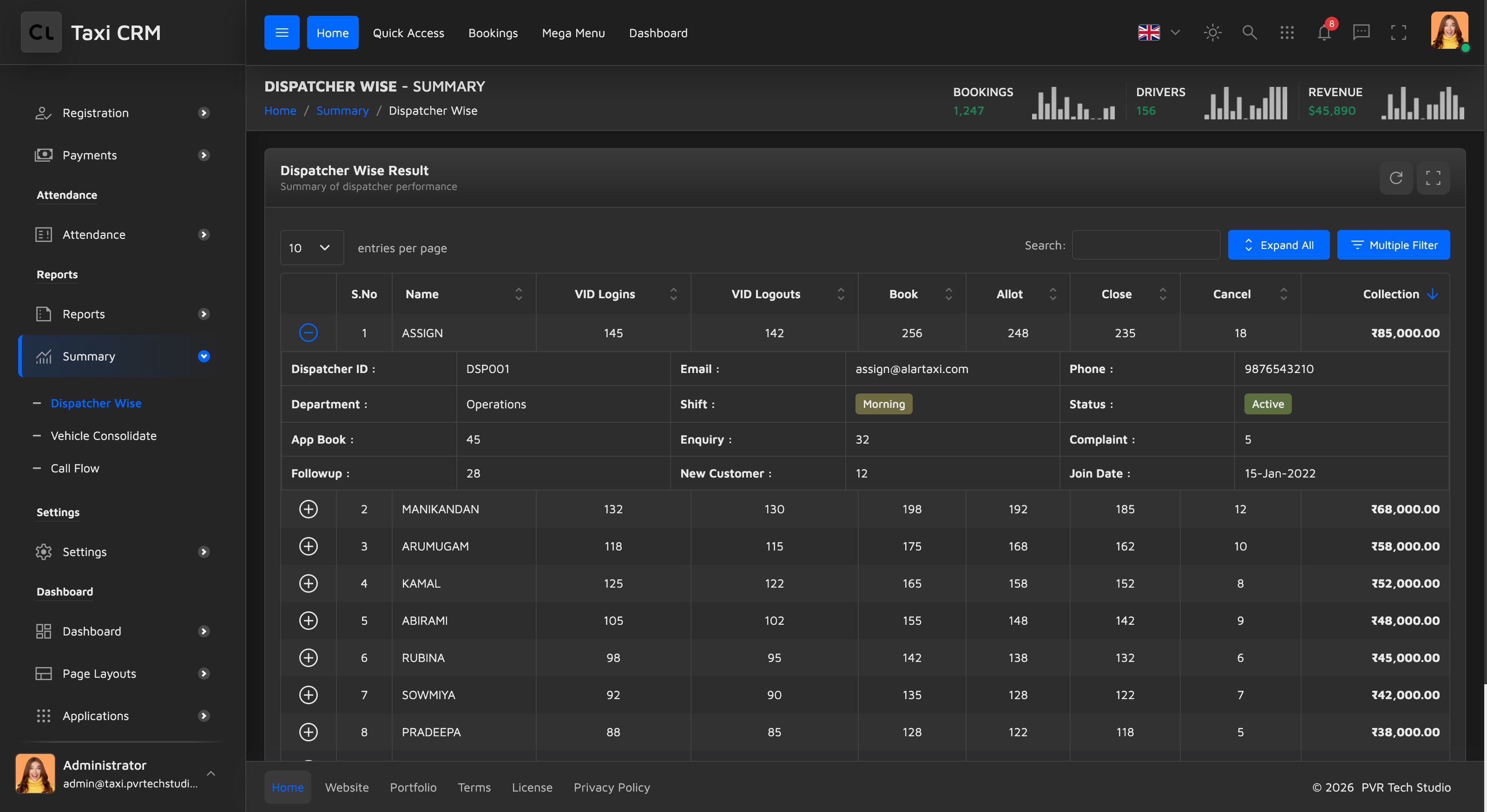
Grid columns:
| Column | Notes |
|---|---|
| S.No | Row index |
| Name | Dispatcher name (searchable) |
| VID Logins | Vehicle-ID login count (centered) |
| VID Logouts | Vehicle-ID logout count (centered) |
| Book | Bookings created (centered) |
| Allot | Allotments made (centered) |
| Close | Trips closed (centered) |
| Cancel | Trips cancelled (centered) |
| Collection | Total collected, right-aligned |
There is a hidden Dispatcher Wise Search panel for filtering the summary. Unlike the action pages, this grid has no Action column — it is read-only reporting.
Customize: point dispatcherWise.js at your reporting endpoint and map each dispatcher's
aggregates to these columns. This page pairs well with the Widgets
KPI tiles and Charts if you want a visual summary above the table.
Regular Trips (regularTrips.html)
Manages recurring / scheduled trips — standing arrangements that repeat on chosen days of
the week between a start and end date (for example, a daily office commute). Used by booking
staff who set up and maintain repeat customers. Page subtitle is Scheduled Trips; the script
is assets/js/pages/bookings/regularTrips.js.
Grid columns:
| Column | Notes |
|---|---|
# | Row index |
| Customer Name | Searchable |
| Mobile | Searchable |
| From | Pickup location (searchable) |
| To | Drop location (searchable) |
| Start Date | Schedule start (searchable) |
| End Date | Schedule end (searchable) |
| Days in Week | Recurrence days, filterable via a column select |
| Pickup Time | Searchable |
| Status | Filterable via a column select (e.g. active / paused) |
| Action | Edit / manage the recurring trip |
The hidden Regular Trips Search panel filters by the same criteria. Days in Week and
Status both use .apply_select dropdown filters.
Customize: model the recurrence (days-of-week + date range) in your backend and bind it to
the Days in Week column; wire the Action and Status controls in regularTrips.js. For badge
styling on the Status column, reuse the kit badges (see Tables).
Auto-Assigned Bookings (autoAssignedBookings.html)
A DataTable of recurring trips the dispatch engine assigned automatically (e.g. standing
daily pickups), so operations staff can review and adjust them. Page subtitle is Regular
Bookings; the script is assets/js/pages/bookings/autoAssignedBookings.js (with
shared/data.js).
Grid columns:
| Column | Notes |
|---|---|
# | Row index |
| Customer Name | Searchable |
| Mobile | Searchable |
| From | Pickup location (searchable) |
| To | Drop location (searchable) |
| Vehicle Type | Filterable via a column select |
| Pickup Time | Searchable |
| Days in Week | Recurrence days, filterable via a column select |
| Fare | Right-aligned (searchable) |
| Status | Filterable via a column select |
| Action | Review / adjust the assignment |
A hidden multi-filter panel and the per-column search/select row come from the shared table
setup. Vehicle Type, Days in Week and Status use .apply_select dropdown filters.
Customize: point autoAssignedBookings.js at your auto-assignment engine's output and bind
the recurrence (Days in Week) and Status columns; wire the Action controls to your override
flow. See Tables for the filter panel and column-search wiring.
Cancelled Trips (cancelledTrips.html)
A record of trips that were cancelled, with the reason captured per row. Used by
operations and support to review cancellations and follow up. Page subtitle is Trip
Management; the script is assets/js/pages/bookings/cancelledTrips.js.
Grid columns:
| Column | Notes |
|---|---|
# | Row index |
| PNR | Booking reference (searchable) |
| Name | Passenger name (searchable) |
| From | Pickup location (searchable) |
| To | Drop location (searchable) |
| Pickup Time | Searchable |
| Cancel Reason | Filterable via a column select |
| Vehicle Type | Filterable via a column select |
| Action | Review / restore-style controls |
The hidden Cancelled Trips Search panel narrows the list. Cancel Reason and Vehicle Type
are dropdown (.apply_select) filters so staff can group cancellations by cause.
Customize: supply your cancellation reasons as the Cancel Reason filter options and bind
real data in cancelledTrips.js. Note this page (unlike most siblings) does not include
shared/data.js — it loads its own data from its page script.
Pickup & Drop (pickupDrop.html)
Tracks active trips through their pickup and drop legs, including the SMS notification
status sent to the customer. Used by dispatchers monitoring trips in progress. Page subtitle
is Trip Management; the script is assets/js/pages/bookings/pickupDrop.js (with
shared/data.js).
Grid columns:
| Column | Notes |
|---|---|
# | Row index |
| PNR | Booking reference (searchable) |
| Name | Passenger name (searchable) |
| From | Pickup location (searchable) |
| To | Drop location (searchable) |
| Pickup Time | Searchable |
| Exp Drop | Expected drop time (searchable) |
| Vehicle Type | Filterable via a column select |
| SMS Status | Notification state, filterable via a column select |
| Action | Trip controls |
A hidden Pickup & Drop Search panel filters the list; Vehicle Type and SMS Status are dropdown filters.
Customize: the SMS Status column is the distinguishing feature — bind it to your messaging
provider's delivery state and present it as a badge. Wire the rest in pickupDrop.js.
Free Vehicle (freeVehicle.html)
A real-time view of available, unassigned vehicles ready for the next booking, with
idle-time and collection context to help dispatchers pick the right one. Used by dispatchers
during allocation. Page subtitle is Current Status; the script is
assets/js/pages/bookings/freeVehicle.js (with shared/data.js).
This grid is read-only and column-rich — there is no Action column; every column is a
searchable text column (.apply_search):
| Column | Notes |
|---|---|
| S.No | Row index |
| VID | Vehicle ID |
| Vehicle Number | Plate / registration |
| Driver Name | Assigned driver |
| Idle Time | How long the vehicle has been free |
| Month Coll | Month-to-date collection |
| Empty KM | Distance driven without a fare |
| Trips | Trip count |
| Collection | Collection total |
| CC Balance | Cash-collection / account balance |
| Login Time | When the vehicle logged in |
| Current Location | Last known location |
The hidden Free Vehicle Search panel filters across these fields.
Customize: this page is meant to reflect live status, so connect freeVehicle.js to a
real-time feed and consider sorting by Idle Time. Because all columns are .apply_search, add
a column select only where you want a dropdown filter instead of free-text search.
Lock Vehicle (lockVehicle.html)
Controls vehicles that have been locked out of service — typically for unpaid dues,
expired documents or pending payments — so they can't be dispatched until resolved. Used by
fleet managers and accounts staff. Page subtitle is Vehicle Management; the script is
assets/js/pages/masters/lockVehicle.js (note it lives under masters/).
Unlike the other pages, Lock Vehicle opens with a row of four summary stat cards
(widget-stats-card-2) above the table:
| Card | Meaning | Pattern |
|---|---|---|
| Total Locked | Count of locked vehicles (#totalLockedVehicles) | red |
| Payment Pending | Vehicles awaiting payment (#paymentPendingCount) | orange |
| Document Expired | Vehicles with expired documents (#documentExpiredCount) | yellow |
| Total Due Amount | Sum of dues in ₹ (#totalDueAmount) | blue |
Each card shows a trend indicator (--up / --down / --neutral). These reuse the kit's
pale palette — see Widgets for the widget-stats-card-2 anatomy.
Grid columns:
| Column | Notes |
|---|---|
# | Row index |
| Vehicle No | Searchable |
| Owner Name | Searchable |
| Driver Name | Searchable |
| Mobile | Searchable |
| Lock Reason | Filterable via a column select |
| Due Amount | Outstanding amount (searchable) |
| Locked Date | When it was locked (searchable) |
| Status | Filterable via a column select |
| Action | Lock / unlock controls |
The hidden Vehicle Search panel filters the locked list; Lock Reason and Status are dropdown filters.
Customize: populate the four summary cards from your locked-vehicle aggregates in
lockVehicle.js (the spans carry stable IDs like #totalDueAmount), define your Lock Reason
options, and wire the Action column to your lock/unlock endpoints. Keep the card patterns to
the documented pale colors rather than introducing new hex values — see
CSS System.
Was this page helpful?