
Fleet & Vehicles
The fleet management pages — vehicle registers, the vehicle master, fleet model catalogue, and the three vehicle reports that ship with Taxi CRM 2026.
The Fleet & Vehicles area covers everything to do with the cars in your taxi
operation: the operational vehicle register (vehicle.html), the full inventory
record in the vehicle master (vehicleMaster.html), the catalogue of make/model
templates that drive tariffs (fleetModels.html), and three fleet reports —
vehicle statistics (vehicleStatistics.html), vehicle summary
(vehicleSummary.html) and vehicle consolidation (vehicleConsolidate.html).
A small settings table (anyVehicleSettings.html) holds fleet-wide assignment
options.
Each list page is a DataTable in a card panel; each add/edit page is a single
form in a card panel built from form-floating inputs and select2 dropdowns.
None of these pages carry inline data — they call their page script under
assets/js/pages/masters/, .../reports/ or .../settings/ to load rows and
populate selects. See Tables for DataTable wiring and
Forms for the form controls.
Vehicles (vehicle.html)
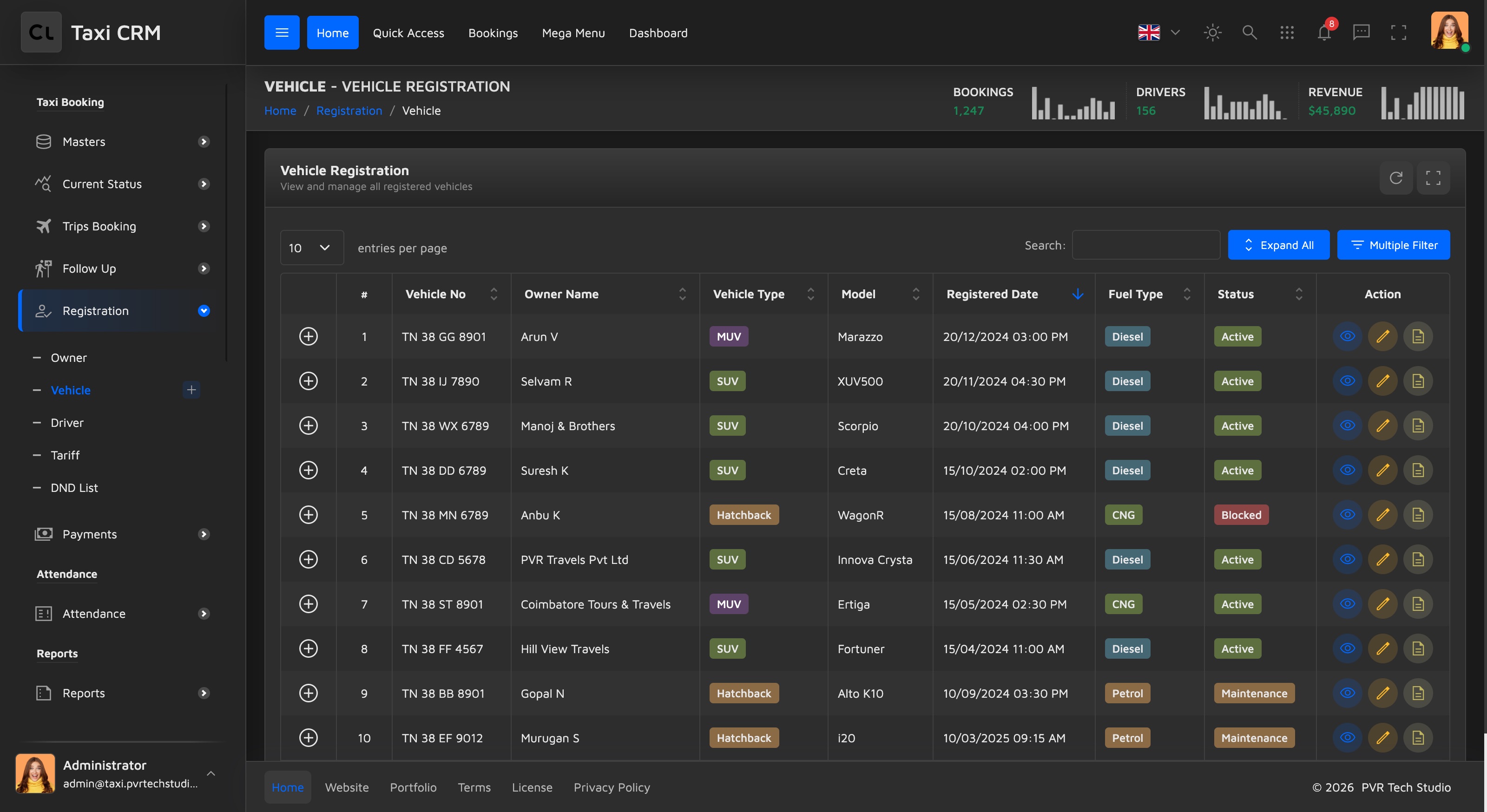
Purpose. The operational vehicle register — a searchable, sortable list of every registered vehicle and its current status. This is the day-to-day "which cars do we have and are they available" view.
Users. Fleet managers and dispatchers.
Key columns. The DataTable (#initDataTable) shows: an expand/detail control,
# index, Vehicle No, Owner Name, Vehicle Type, Model, Registered Date, Fuel
Type, Status, and an Action column. Columns marked .apply_search (Vehicle No,
Owner Name, Registered Date) get per-column text filters; .apply_select columns
(Vehicle Type, Model, Fuel Type, Status) get dropdown filters. A hidden
multi-criteria filter panel (#show_multiple_filter_div) can be revealed for
advanced search.
Actions. Add a vehicle (links to addVehicle.html), plus per-row edit/view via
the Action column.
Customize. Add or remove a th in the thead and update the matching column
config in assets/js/pages/masters/vehicle.js. Keep .apply_search /
.apply_select classes consistent with the filter type you want.
Add / Edit Vehicle (addVehicle.html)
Purpose. The form behind the Vehicles register — registers a new car (or edits an existing one) with the full operational detail set.
Users. Fleet managers.
Key sections / fields. The form (#addVehicleForm) is grouped into headed
sections:
| Section | Fields |
|---|---|
| Vehicle Information | Vehicle Number, Vehicle Type (Sedan/SUV/Hatchback/MUV/Tempo Traveller/Luxury), Status (Active/Inactive/Maintenance/Blocked), Make, Model, Year, Color, Fuel Type, Seating Capacity |
| Technical Details | Chassis Number, Engine Number, GPS Device ID |
| Owner Information | Owner Name (select), Mobile Number, Registered Date |
| Documents Information | Insurance Number, Insurance Expiry, FC Expiry, Permit Number, Permit Expiry, Odometer (km) |
| Additional Information | Remarks (textarea) |
Cancel returns to vehicle.html; Submit posts the form via the page script.
Difference from Add Vehicle Master. addVehicle is the operational record
(GPS device, chassis/engine numbers, seating capacity, vehicle type, remarks) tied
to the vehicle.html register. addVehicleMaster (below) is the inventory /
master record, oriented around make/model/registration, compliance expiry dates,
service schedule and the driver-app toggle. They overlap on basics (make, model,
year, color, fuel, owner, odometer, document expiries) but serve different lists.
Customize. Owner Name is an empty select2 populated by the page script — wire
it to your owner/customer source. Add fields by adding a form-floating column in
the relevant section.
Vehicle Master (vehicleMaster.html)
Purpose. The master inventory of the fleet — the canonical record of every vehicle with its specs, ownership, compliance documents and assignment. Wider and more document-focused than the operational register.
Users. Fleet/operations administrators responsible for compliance and records.
Key columns. S.No, Make, Model, Registration, Year, Color, Fuel Type, Owner, Odometer, Insurance, FC, Permit, Driver, App, Status, Action. The Insurance / FC / Permit columns surface compliance expiry; App shows whether the vehicle is enabled in the driver app. Searchable columns: Make, Model, Registration, Owner, Driver; dropdown-filtered: Color, Fuel Type, App, Status.
Customize. Same pattern as the Vehicles list — edit the thead and
assets/js/pages/masters/vehicleMaster.js. The compliance columns pair with the
date fields on the add/edit form below.
Add / Edit Vehicle Master (addVehicleMaster.html)
Purpose. Create or edit a vehicle master record. This is the "Add / Edit" page
for vehicleMaster.html.
Users. Fleet/operations administrators.
Key sections / fields. The form (#addVehicleForm) is grouped as:
| Section | Fields |
|---|---|
| Basic Vehicle Information | Make (select), Model, Registration Number, Vehicle Number, Year, Color, Fuel Type |
| Owner Information | Owner Name, Owner Contact |
| Vehicle Metrics & Device | Odometer (km), IMEI Number, Driver |
| Compliance Information | Insurance Expiry, FC Expiry, Permit Expiry (all date inputs) |
| Service Information | Last Service Date, Next Service Due |
| Status Information | App Enabled (Yes/No), Status (Active/Inactive/Disabled) |
Cancel returns to vehicleMaster.html; Submit posts via the page script.
Customize. The compliance and service date fields feed the Insurance/FC/Permit
columns and any renewal reminders — keep field names aligned with what
addVehicleMaster.js posts. Make is a fixed select2 option list; swap the
options or load them from your data.
Fleet Models (fleetModels.html)
Purpose. The catalogue of make/model templates and tariff categories available to the fleet. A vehicle is an instance of a model; the model defines body type, fuel, transmission, seats, mileage and the base fare multiplier used in pricing.
Users. Administrators who maintain the fleet's pricing and model catalogue.
Key columns. S.No, Make, Model, Tariff, Body Type, Fuel Type, Transmission, Seats, Mileage, Year Range, Fare (base fare multiplier), Status, Action. Searchable: Make, Model; dropdown-filtered: Tariff, Body Type, Fuel Type, Transmission, Status.
Customize. Edit the thead and assets/js/pages/masters/fleetModels.js. The
Tariff and Fare columns connect to pricing — see Settings
and any fare/tariff configuration.
Add / Edit Fleet Model (addFleetModels.html)
Purpose. Create or edit a fleet model template — the add/edit page for
fleetModels.html.
Users. Catalogue/pricing administrators.
Key sections / fields. The form (#addFleetModelsForm):
| Section | Fields |
|---|---|
| Basic Information | Make, Model, Status (Active/Inactive) |
| Vehicle Specifications | Tariff (Mini/Hatch Back/Sedan/SUV/MPV/Premium/Luxury variants), Body Type, Fuel Type, Transmission (Manual/Automatic), Seats, Mileage |
| Additional Details | Year Range (e.g. 2018-2024), Base Fare Multiplier (0.5–5.0, default 1.0) |
Cancel returns to fleetModels.html; Submit posts via the page script.
Customize. The Tariff select2 ships a fixed category list — edit those options
to match your pricing tiers. Base Fare Multiplier is the per-model pricing factor.
Vehicle Statistics (vehicleStatistics.html)
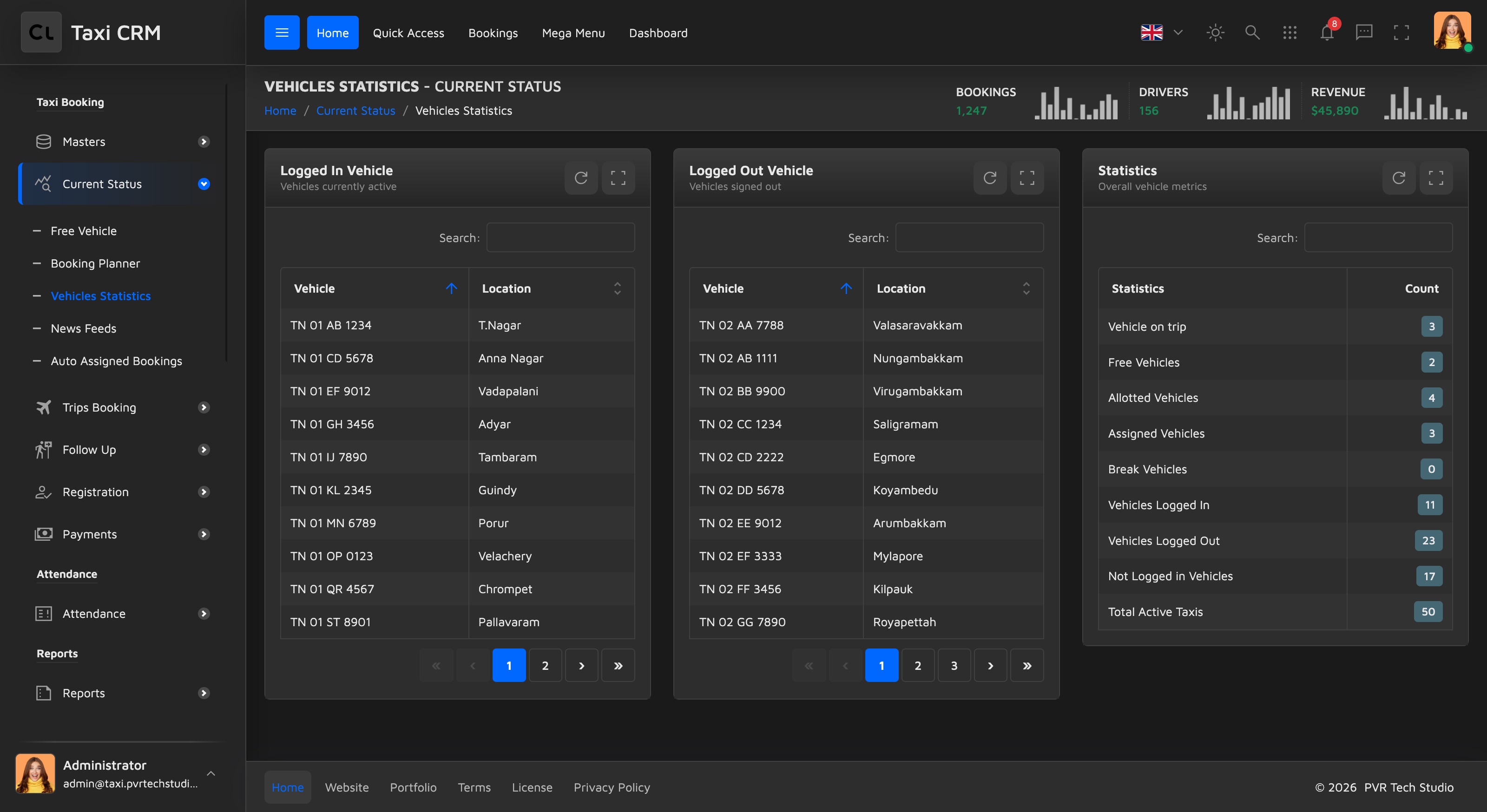
Purpose. A live fleet-status snapshot. Three side-by-side panels show which vehicles are currently logged in, which are logged out, and overall count statistics. This is a real-time operational dashboard rather than a historical report.
Users. Dispatchers and fleet managers monitoring availability.
Key sections. A three-column row (col-lg-4 each):
- Logged In Vehicle (
#loggedInTable) — Vehicle, Location. - Logged Out Vehicle (
#loggedOutTable) — Vehicle, Location. - Statistics (
#statsTable) — Statistics (metric name), Count.
All three are auto-height DataTables (.dt-wrapper-auto-height) populated by
assets/js/pages/reports/vehicleStatistics.js.
This page is a fleet report — it also relates to Reports.
Customize. Add rows to the Statistics table or extra columns to the in/out tables via the page script. If you have a tracking provider, feed the Location column from it.
Vehicle Summary (vehicleSummary.html)
Purpose. A per-vehicle performance summary report — trips, distance and earnings for each vehicle over a selected period.
Users. Owners and managers reviewing fleet productivity.
Key columns. Detail control, # index, Vehicle No, Driver, Type, Trips,
Distance, Earnings, Status. Trips/Distance/Earnings are right-aligned numeric
columns (.text-end). A hidden filter panel supports filtering by date range.
This page is a fleet report — it also relates to Reports.
Customize. Edit the thead and assets/js/pages/reports/vehicleSummary.js.
Wire the date-range filter in #show_multiple_filter_div to your reporting query.
Vehicle Consolidate (vehicleConsolidate.html)
Purpose. A consolidated operating report per vehicle — utilisation and revenue rolled up across a date range, including loaded vs. empty running.
Users. Operations analysts and owners.
Key columns. Detail control, S.No, VID (vehicle ID), No of Days, Trips, Run Km, Empty Km, Per Day, Collection. Run Km vs. Empty Km expose dead-mileage; Per Day and Collection summarise productivity and revenue. VID is searchable; the numeric columns are centre/right aligned.
This page is a fleet report — it also relates to Reports.
Customize. Edit the thead and assets/js/pages/reports/vehicleConsolidate.js.
The hidden search panel is the place to add the date range and vehicle filters.
Any Vehicle Settings (anyVehicleSettings.html)
Purpose. A small key/value settings table for fleet-wide vehicle assignment options (the "any vehicle" rules used when assigning trips).
Users. Administrators configuring assignment behaviour.
Key columns. S.No, Property, Property Value, Category, Status (status is dropdown-filtered). Rows are configuration entries rather than vehicles.
Customize. Maintain the rows in
assets/js/pages/settings/anyVehicleSettings.js. This is a settings surface — see
Settings for the broader configuration model.
Lock Vehicle (lockVehicle.html)
Purpose. Restrict a vehicle from operating when there's a reason to take it off the road — most commonly an overdue payment, an expired document, or an administrative hold. The page header subtitle is Vehicle Management, and the page lives under the Payments menu group (alongside Payment List, Make Payment and Pending Payment) because the main driver for locking is unpaid dues.
Users. Operations and finance staff enforcing payment and compliance rules.
Layout. Four widget-stats-card-2 summary tiles run across the top:
Total Locked (red), Payment Pending (orange), Document Expired
(yellow) and Total Due Amount (blue), each with a trend indicator and a value
filled by the page script (#totalLockedVehicles, #paymentPendingCount,
#documentExpiredCount, #totalDueAmount). Below sits a hidden Vehicle Search
filter panel (#show_multiple_filter_div) and the main Locked Vehicles
DataTable (#initDataTable).
Key columns. Detail control, # index, Vehicle No, Owner Name, Driver Name,
Mobile, Lock Reason, Due Amount, Locked Date, Status, Action. Vehicle No, Owner
Name, Driver Name, Mobile, Due Amount and Locked Date are text-searchable
(.apply_search); Lock Reason and Status are dropdown-filtered (.apply_select).
Customize. Despite living in the Payments menu, the page script is
assets/js/pages/masters/lockVehicle.js (note: under masters/, not
payments/) — wire the tile values, table rows and the lock/unlock row actions
there. See Widgets for the widget-stats-card-2
anatomy and Payments for the dues this page acts on.
Was this page helpful?