
Bookings
The Trips Booking pages — form and map booking entry, intercity/outstation trips and cash-collection records.
The Trips Booking category is where a new trip is created and where booking-level records
are kept. It groups seven pages in the sidebar: two booking-entry screens — bookingV1.html
(form entry) and bookingV2.html (map entry) — the dispatch action pages assignAllot.html,
pickupDrop.html and regularTrips.html, the intercityBookings.html outstation list, and the
ccCollections.html cash-collection list.
This page documents the booking-entry and record screens (bookingV1, bookingV2,
intercityBookings, ccCollections). The three dispatch action pages — Assign / Allot,
Pickup / Drop and Regular Trips — are covered in
Trips & Dispatch, and the live dispatch board, auto-assigned
bookings, cancelled trips, PNR lookup and call-flow summary live there or under
Reports.
The list pages are standard DataTables screens — see Tables for sorting, the per-column search row and the multi-filter panel they share. Every page is assembled from the kit's shared layout (header, sidebar, page header, card panels and a responsive grid); see Layout.
Booking — Form View (bookingV1.html)
The primary manual booking screen (page subtitle Trips Booking). A call agent uses it to
capture a new trip while a caller is on the line. It is a two-column layout: a
vehicle-availability accordion (the vehicleAccordion mixin) on the left and the full booking
form on the right (panel title Booking Panel).
The left column is a Bootstrap accordion with four collapsible panels:
| Accordion panel | Contents |
|---|---|
| Custom Vehicle Search | Look up a vehicle by number, registration or mobile; expands a full details table (driver, model, seat capacity, current location, today/total collection, pending target). |
| Consolidated Details | Live status counts — Free, Running, Allotted, Break, Leave — with total and assigned vehicle totals. |
| Free Vehicle | Table of available vehicles (vehicle, location, distance) with a live count badge. |
| Assigned Vehicle | Vehicles already on assigned trips, same columns. |
The right column is #bookingForm. Key fields: Caller Mobile, Unique ID (read-only), Call Type
(Booking / Enquiry / Follow-up / Feedback / Complaint / VNA), Customer Name and Mobile, Zone,
Pickup and Drop Location, No. of Passengers, Preferred Model, Tariff Type (Local / Rental /
Outstation / Airport / Package), three switches (Schedule Booking, Round Trip, Emergency),
Pickup Date and Time, Landmark, Remarks, Follow-up Mobile, Landline, Number of Vehicles and
Accessories. Actions are Reset and Book Now (a btn-green submit). The
location/model/zone selects are Select2 dropdowns and the fields use form-floating — see
Forms.
Customize: Field options live in the page markup (callType, tariffType) or are populated from
assets/js/pages/shared/data.js via assets/js/pages/bookings/bookingV1.js. Add or remove
form fields in the .row blocks; drop an unused accordion panel by deleting its markup from the
left column.
Booking — Map View (bookingV2.html)
A full-screen map-based dispatch alternative to the form view, for agents who allocate by
seeing where vehicles are. It renders a Google Map (loaded with a mapAPIKey and the
markerclusterer plugin for marker clustering) with floating panels overlaid.
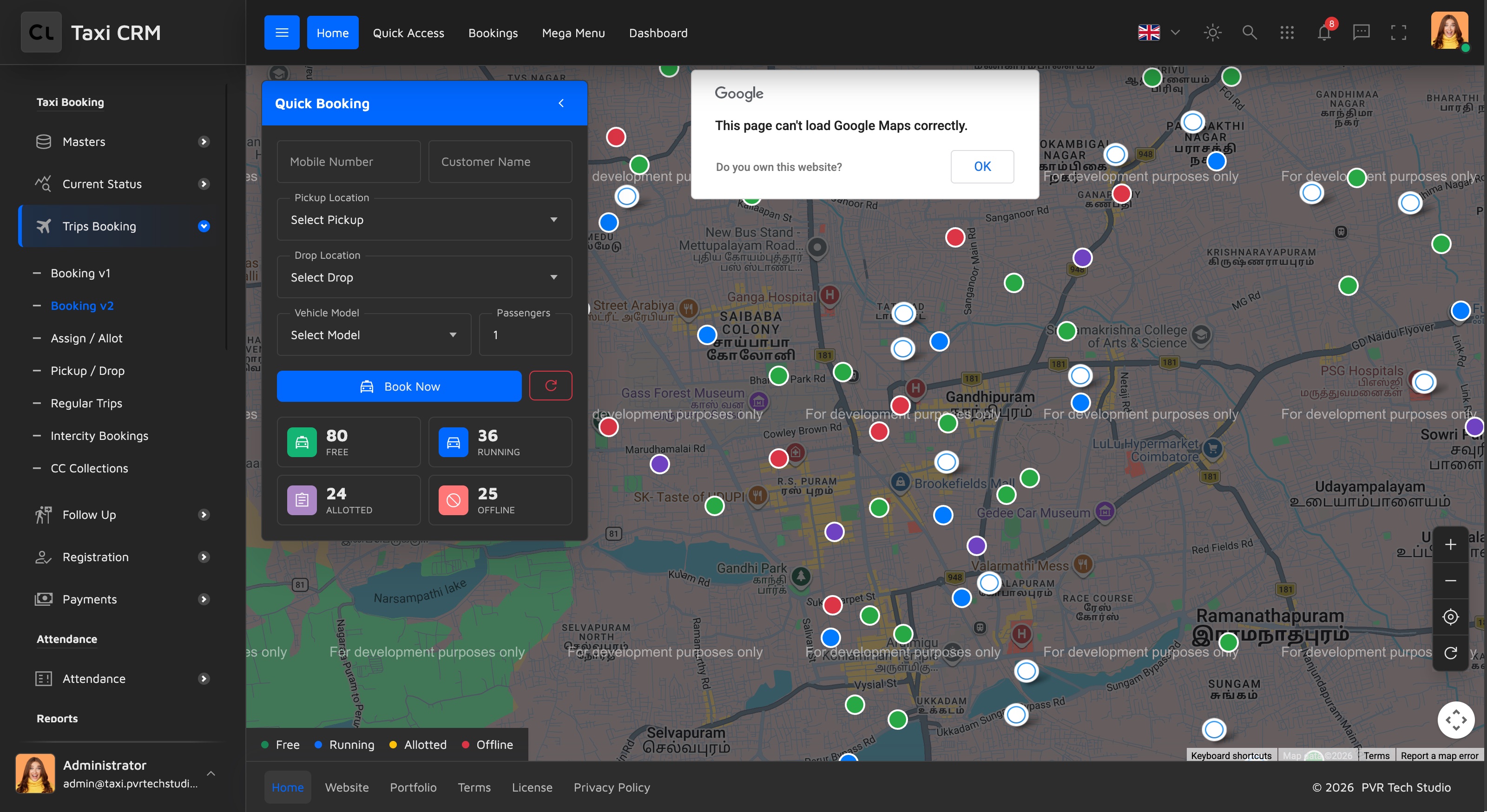
- Quick Booking panel (left, collapsible): a condensed form — Mobile, Name, Pickup, Drop, Vehicle Model, Pax — plus Book Now / reset. Below it, four clickable vehicle stat cards (Free, Running, Allotted, Offline) that double as map filters.
- Info panel (right, collapsible): shows context for the current selection in three sections — Route Info (distance, duration, estimated fare with a base/distance/time fare breakdown), Nearby Vehicles (count + list), and Vehicle Info (driver, mobile, status badge, location, distance) with an Assign Vehicle action.
- Map controls (zoom in/out, center, refresh vehicles) and a Legend keyed to the marker colours: Free (green), Running (blue/primary), Allotted (amber), Offline (red).
Customize: Set your Google Maps key where mapAPIKey is defined (the script loads with an
initGoogleMap callback); map behaviour, marker data and fare math live in
assets/js/pages/bookings/bookingV2.js (with demo data from assets/js/pages/shared/data.js).
Marker colours map to the same statuses as the stat cards — keep the two in sync if you rename a
status. Responsive behaviour stacks the panels below the map on tablet/mobile.
Intercity Bookings (intercityBookings.html)
A DataTable for outstation / intercity trips (page subtitle Outstation Trips), which carry extra route and return-date fields that local bookings don't.
Columns: row checkbox, #, Booking ID, Customer Name, Mobile, From City, To City, Trip Type,
Journey Date, Return Date, Vehicle Type, Status and Action. The Booking ID, Customer Name,
Mobile, From City, To City and the two date columns are apply_search text columns; Trip Type,
Vehicle Type and Status are apply_select dropdown filters. A hidden multi-filter panel and the
per-column search/select row come from the shared table setup.
Customize: Edit the thead for columns; data and row actions are in
assets/js/pages/bookings/intercityBookings.js (with shared/data.js). The Trip Type and
Vehicle Type filters draw from your trip-type and vehicle lists — populate them to match your
outstation routes. See Tables for the filter panel and column-search
wiring.
CC Collections (ccCollections.html)
A DataTable of cash / card collection records logged against drivers (page subtitle Payment
Collections). It tracks what each driver collected and how it was split across payment modes.
It has a matching create/edit form, addCcCollections.html (see the sidebar's ADD_PAGE_MAP).
Columns: row checkbox, #, Collection ID, Driver Name, Driver ID, Collection Date, Collection
Type, Cash Amount, Card Amount, Corporate Amount, Total Collection, Status and Action. Collection
ID, Driver Name, Driver ID and Collection Date are apply_search columns; Collection Type and
Status are apply_select filters; the four amount columns are right-aligned.
Customize: This page's script lives under assets/js/pages/payments/ccCollections.js (note
the payments/ folder, since collections are a payments concern). Bind the amount columns to your
collection records and define your Collection Type options. See
Payments for the broader collection/payment flow.
Was this page helpful?