
Payments & Billing
The payment lifecycle pages — recording transactions, processing payments, chasing dues, collecting from drivers, invoicing clients, and configuring gateways.
The Payments & Billing area covers the money side of Taxi CRM 2026 — from recording a single transaction through to chasing outstanding dues, reconciling driver collections, generating client invoices, and configuring the gateways and tax rules that everything else relies on.
These pages are aimed at developers customizing the template. Each section below maps to one
page; list pages are paired with their add/edit form. The pages share the kit's standard
building blocks — the page header, card panels, Bootstrap grid rows, DataTables
(#initDataTable), Select2 dropdowns and form-floating inputs — so customizing one is mostly
a matter of editing the columns, fields and the page script under assets/js/pages/payments/.
The sidebar Payments menu group holds four pages — Payment List, Make Payment, Pending Payment and Lock Vehicle. The remaining money-related pages live in other menus but are documented here because they belong to the same workflow: CC Collections sits under the Trips/Booking group, Invoice is a standalone top-level item, and Payment Settings is under Settings. The pages in this area:
| Page | File | Role |
|---|---|---|
| Payment List | paymentList.html | All payment transactions (DataTable) |
| Add Payment | addPaymentList.html | Record a transaction manually |
| Make Payment | makePayment.html | Process a payment against a booking |
| Pending Payments | pendingPayment.html | Outstanding / overdue dues |
| Lock Vehicle | lockVehicle.html | Lock vehicles with overdue dues or expired docs |
| CC Collections | ccCollections.html | Cash / card / corporate collections from drivers (Trips/Booking menu) |
| Add CC Collection | addCcCollections.html | Record a driver collection |
| Invoice | invoice.html | Build and preview a client invoice (standalone menu) |
| Payment Settings | paymentSettings.html | Gateways, taxes, charges, invoicing rules (Settings menu) |
Payment List (paymentList.html)
Purpose: The master register of every payment transaction. Users: finance / admin staff reviewing or auditing payments.
The page is a single card panel wrapping a DataTable (#initDataTable) plus a hidden multi-criteria
filter panel (#show_multiple_filter_div) that the kit's table toolbar toggles. Columns:
| Column | Notes |
|---|---|
| (expand) | Row-detail control |
| # | Index |
| Transaction ID | Searchable |
| Booking ID | Searchable |
| Customer | Searchable |
| Amount | Searchable |
| Payment Mode | Faceted select filter (apply_select) |
| Payment Date | Searchable |
| Status | Faceted select filter — Success / Pending / Failed / Partial |
| Action | Row actions |
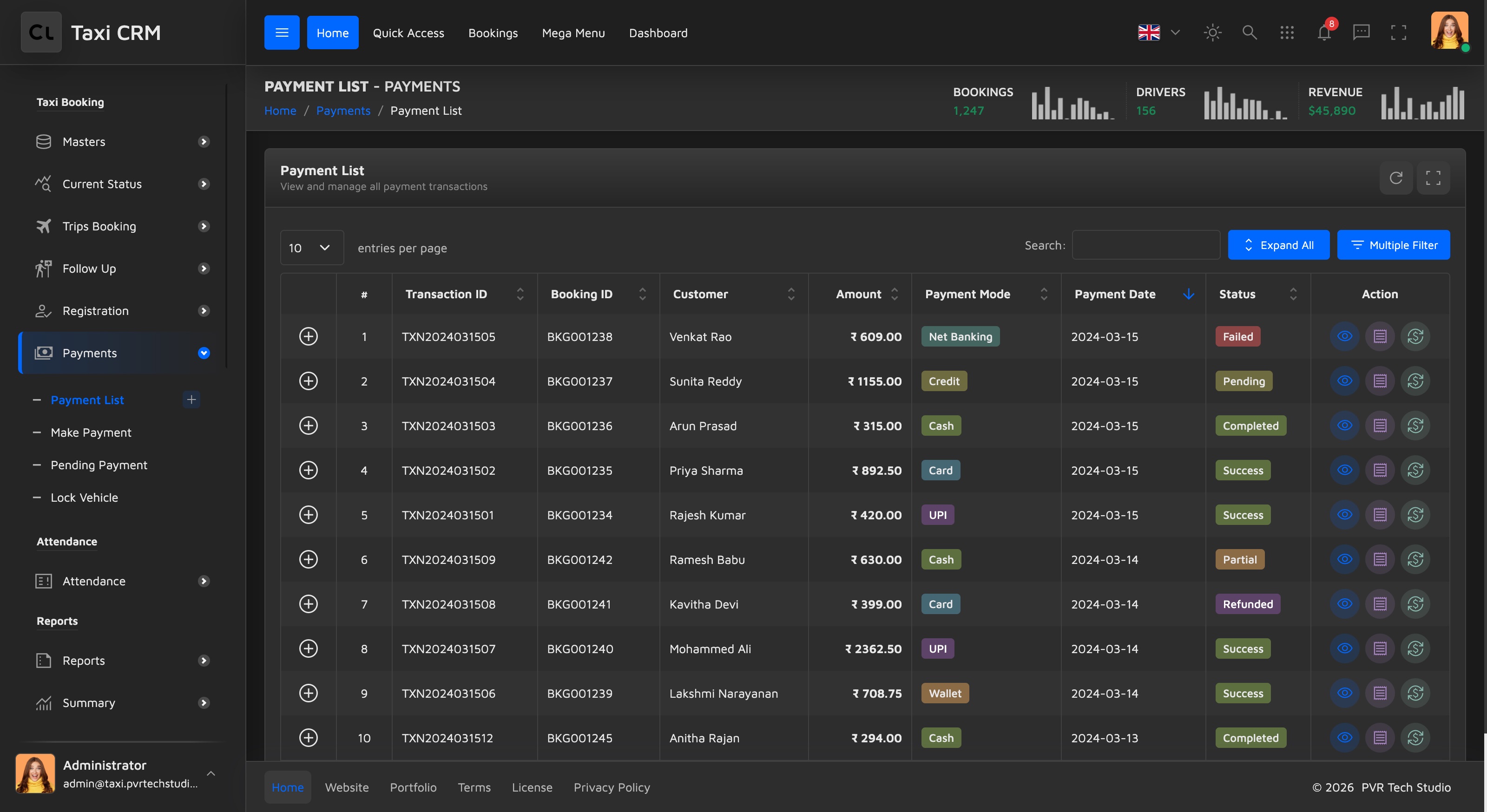
Columns flagged apply_search get a per-column search box; apply_select columns get a dropdown
facet. Customize: change the columns in the thead, then adjust the matching column
definitions and renderers in assets/js/pages/payments/paymentList.js. See
Tables for the DataTable conventions and
Badges for the status badge colors.
Add Payment (addPaymentList.html)
Purpose: Manually record a transaction (e.g. an offline payment). A single-form card panel grouped into labelled sections:
- Booking Information — Booking ID, PNR, Invoice No.
- Customer Information — Customer Name, Mobile, Email.
- Amount Details — Trip Amount, Discount, Tax, then computed Total Amount, Paid Amount and
Balance (Total and Balance are
readonlyand calculated in the page script). - Payment Details — Payment Mode (Cash / UPI / Card / Net Banking / Wallet / Credit), Payment Gateway (Razorpay, Paytm, PhonePe, Google Pay, HDFC, ICICI, SBI), Gateway Reference, Payment Date / Time, and Status.
- Collection Details — Driver Name, Vehicle No, Collected By (Driver / App / Office / Online).
- Remarks — free text.
Actions: Cancel (links back to paymentList.html) and Add Payment (submits the form).
Customize: the dropdown option lists are hard-coded in the select blocks; the total /
balance math and submit handling live in assets/js/pages/payments/addPaymentList.js. See
Forms for the form-floating + Select2 pattern.
Make Payment (makePayment.html)
Purpose: Process a payment against an existing booking, with a live fare breakdown. Users: front-desk / cashier staff taking payment for a trip.
A two-column layout: the left column (col-lg-8) holds the form, the right column (col-lg-4)
holds a live summary.
- Search Booking — Booking ID / PNR and Customer Mobile, with a Search Booking button.
On a match, the hidden
#bookingDetailsSectionreveals read-only booking fields (customer, pickup / drop, vehicle, driver). - Payment Details — Payment Mode, Payment Gateway, Transaction Reference. Two conditional
blocks appear based on mode:
#upiSection(UPI ID + UPI App) for UPI and#cardSection(card type, last 4 digits, bank) for Card. - Amount — Paying Amount and Remarks.
- Payment Summary (right panel) — a line-by-line fare breakdown (base fare, distance,
waiting, night, toll, parking), then Subtotal, Discount, GST (5%), Total Amount, Paid
Amount and Balance Due, finished by a status badge (
#paymentStatusBadge). - Payment History — a second right-column panel listing prior payments for the booking.
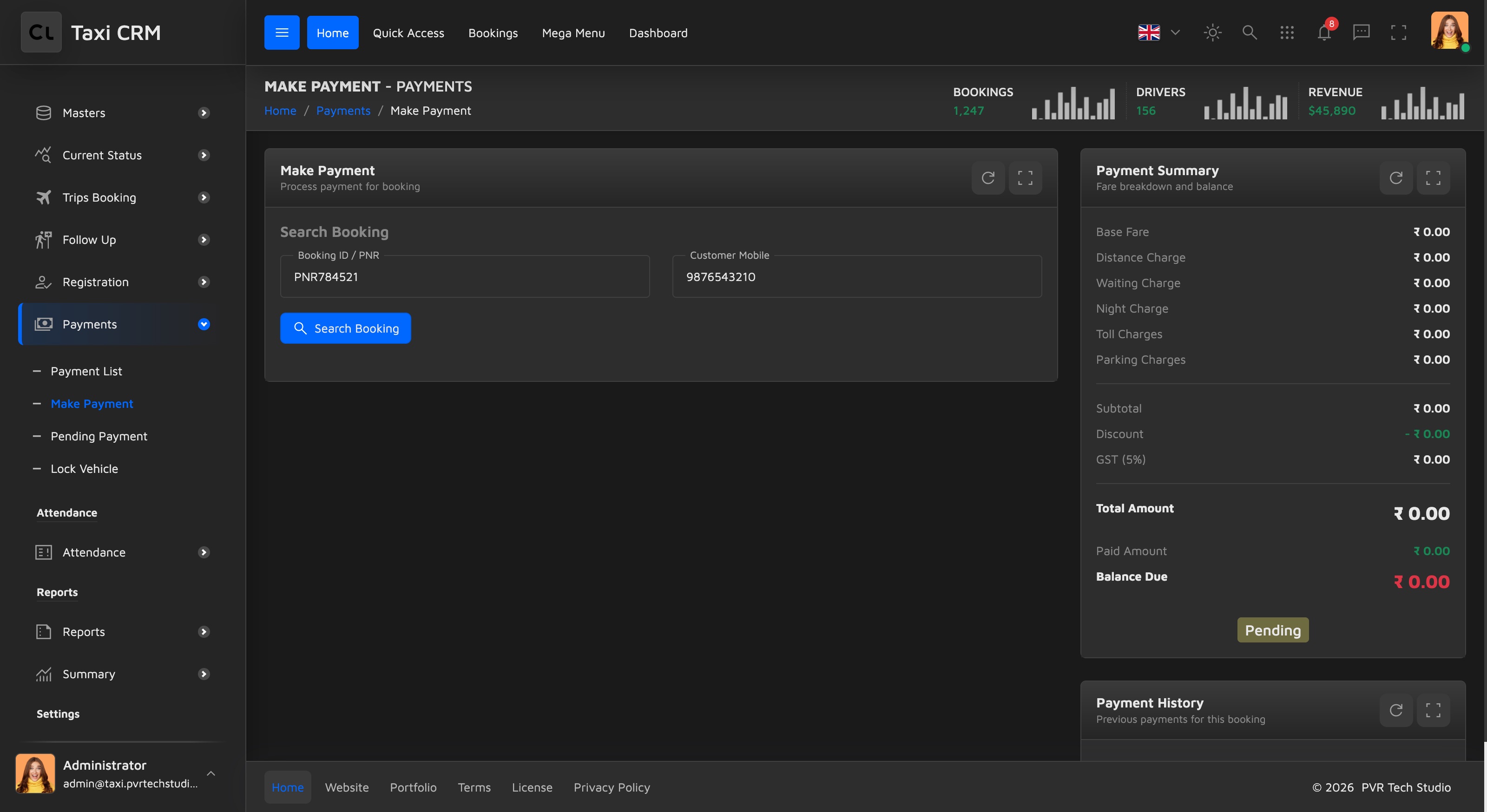
Actions: Cancel and Process Payment. Customize: the conditional UPI / Card sections
toggle by Payment Mode, and the summary totals (including the 5% GST) are computed in
assets/js/pages/payments/makePayment.js — edit the rate and breakdown there. See
Forms.
Pending Payments (pendingPayment.html)
Purpose: Track outstanding balances awaiting collection. Users: finance staff following up on dues.
Above the table sit four widget-stats-card-1 summary tiles with trend sparklines: Total
Pending (red), Today's Due (orange), Overdue (yellow) and Total Bookings (blue).
Their values (#totalPendingAmount, #todayDueAmount, etc.) are filled by the page script.
Below is the same DataTable + hidden filter-panel pattern as Payment List. Columns:
| Column | Notes |
|---|---|
| (expand) / # | Detail control + index |
| PNR | Searchable |
| Customer / Mobile | Searchable |
| Trip Date | Searchable |
| Total Amount / Paid Amount / Balance Due | Searchable |
| Due Status | Faceted select filter |
| Action | Row actions (typically a link to Make Payment) |
Customize: the four stat tiles are the shared widget-stats-card-1 widget — see
Widgets for the markup. Tile values, sparklines and the table are
wired in assets/js/pages/payments/pendingPayment.js.
Lock Vehicle (lockVehicle.html)
Purpose: The enforcement end of the dues workflow — lock a vehicle from operating when its owner/driver has an overdue balance (or an expired document). It is the fourth item in the Payments menu and is the action a Pending Payments row ultimately leads to. Users: finance / operations staff enforcing collection.
Four widget-stats-card-2 summary tiles (Total Locked, Payment Pending, Document
Expired, Total Due Amount) sit above the standard DataTable + hidden filter panel. Columns:
Vehicle No, Owner Name, Driver Name, Mobile, Lock Reason, Due Amount, Locked Date, Status, Action
(Vehicle No / Owner / Driver / Mobile / Due Amount / Locked Date searchable; Lock Reason and
Status as dropdown facets).
Customize: the page script is assets/js/pages/masters/lockVehicle.js (under masters/, not
payments/). Because locking is a fleet operation as much as a billing one, the full anatomy is
documented under Fleet & Vehicles; see
Widgets for the widget-stats-card-2 tiles.
CC Collections (ccCollections.html)
Purpose: Track cash, card and corporate collections from drivers — the money drivers hand back to the company. Users: accounts / branch office staff reconciling driver takings.
Standard card panel + DataTable (#initDataTable) with a hidden filter panel. Columns:
| Column | Notes |
|---|---|
| (expand) / # | Detail control + index |
| Collection ID | Searchable |
| Driver Name / Driver ID | Searchable |
| Collection Date | Searchable |
| Collection Type | Faceted select — Cash / Card / Corporate / Mixed |
| Cash Amount / Card Amount / Corporate Amount / Total Collection | Right-aligned amounts |
| Status | Faceted select filter |
| Action | Row actions |
Customize: columns in the thead; rendering and filters in
assets/js/pages/payments/ccCollections.js.
Add CC Collection (addCcCollections.html)
Purpose: Record a single driver collection. A sectioned form:
- Driver Information — Driver Name (Select2, populated from data), with read-only Driver ID, Mobile and Vehicle Number auto-filled on selection; Collection Date, Total Trips.
- Collection Information — Collection Type (Cash / Card / Corporate / Mixed), Collection Time, Status (Collected / Pending / Partially Collected / Reconciled).
- Amount Details — Cash / Card / Corporate amounts, computed Total Collection (
readonly), Amount Deposited, computed Outstanding Balance and Commission (10%) (bothreadonly). - Corporate Details (
#corporateSection) — shown only for Corporate / Mixed: Corporate Client and Invoice / Reference Number. - Payment Details (
#cardSection) — shown only for Card / Mixed: Transaction ID and Bank. - Additional Information — Collected By (Admin Office, branch offices, Payment Gateway, Corporate Billing) and Remarks.
Actions: Cancel (to ccCollections.html) and Submit. Customize: the conditional
Corporate / Card sections toggle by Collection Type, and the totals, outstanding balance and the
10% commission are computed in assets/js/pages/payments/addCcCollections.js — change the
commission rate there. See Forms.
Invoice (invoice.html)
Purpose: Build a client invoice on the left and see a live, print-ready preview on the right. Users: anyone billing corporate clients.
A two-column layout (col2 each side).
Left — Create Invoice (accordion form), #invoiceFormAccordion, with collapsible sections:
- My Details — issuing company name, ABN / Tax ID, address, email, phone, website.
- Client Details — client name, company, address, email, phone.
- Invoice Details — invoice number, project name, issue / due dates, and a repeatable Line Items list (description, qty, price, computed amount) with Add Item / remove-row controls.
- Tax & Discount — tax rate (%) and discount.
- Payment Details — payment method (Bank Transfer / Credit Card / PayPal / Cash / Cheque), currency (USD / EUR / GBP / INR / AUD), account name, bank code, account number.
- Add Notes — notes and payment terms.
- Add Signature — upload a signature image and signatory name.
A Save Invoice button sits below the accordion.
Right — Invoice Preview (.invoice-document): a styled document mirroring the form — header
with invoice number and logo, project / dates, From / To parties, the line-items table (with a
GST column), totals (subtotal, tax, discount, Total Amount), notes, payment method and
signature. A tab strip (Preview / PDF / Email / Online Payment) and a split Save Invoice
button with a dropdown (Save as Draft / Send to Client / Download PDF) sit in the header.
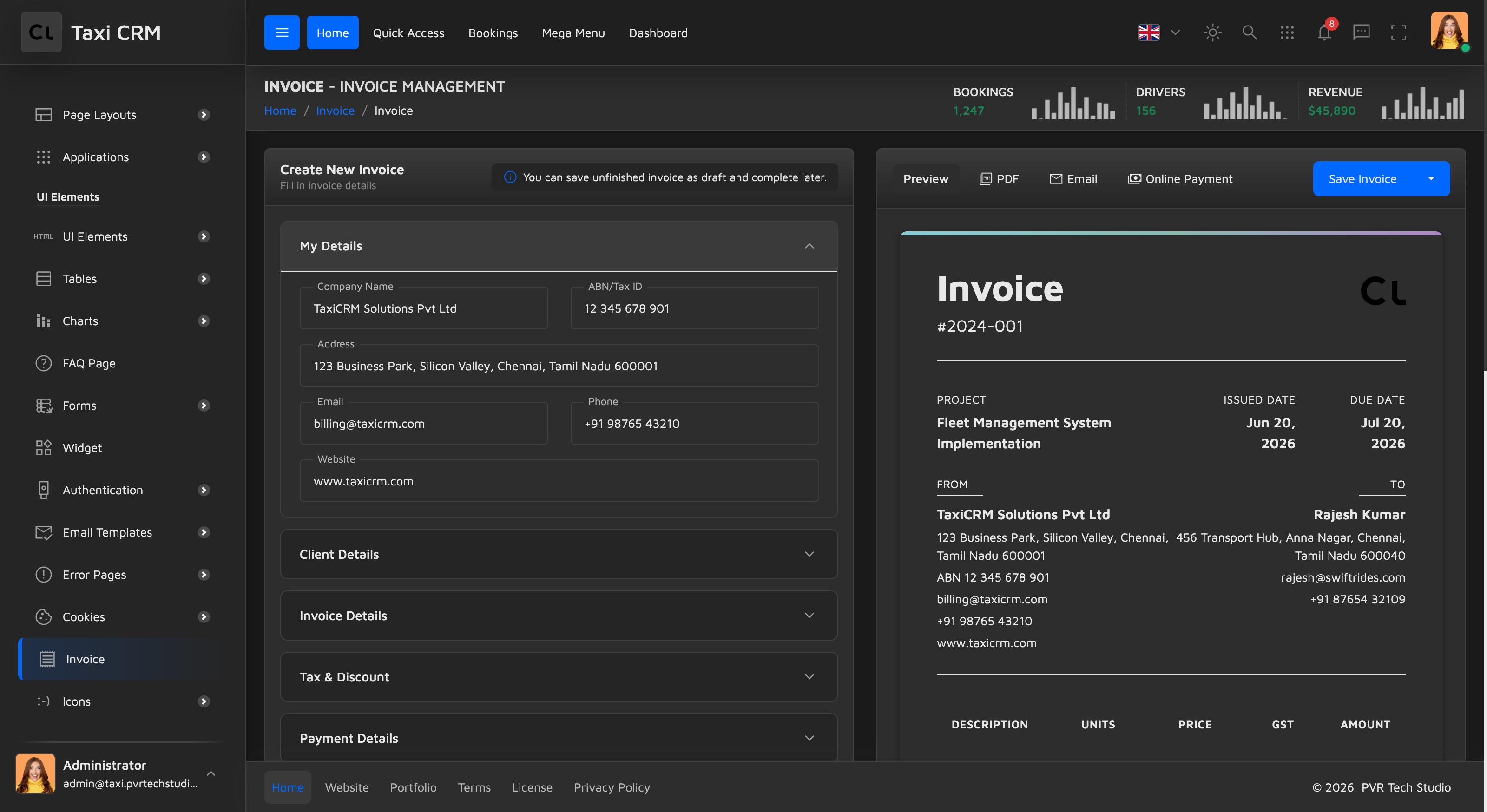
Customize: every preview node has an id (#previewInvoiceNumber, #previewTotal, …) that the
page script keeps in sync as the form changes; line-item math, totals and the preview binding live
in assets/js/pages/payments/invoice.js. The preview layout is styled by the
invoice-* classes — see CSS System.
Payment Settings (paymentSettings.html)
Purpose: A single editable table of payment-related configuration — gateways, taxes, charges, invoicing rules, refund and wallet settings. Users: admins configuring how payments behave across the app.
The page is one card panel around a DataTable (#initDataTable). Each row is a setting:
| Column | Notes |
|---|---|
| S.No | Index |
| Property | Setting name |
| Property Value | Inline-editable (X-editable style) — type adapts to the row's dataType |
| Category | Colored badge |
| Status | Faceted select — Active / Inactive |
Categories are color-coded by the page script: Gateway (purple), Taxes (orange),
Charges (teal), Invoicing (blue), Refund (red), Wallet (green). The
Property Value cell renders as an inline editor whose control depends on the row data type —
a Yes / No select for Boolean, a date picker for Date, otherwise a text input.
Customize: the setting rows come from data, and the badge mapping, status renderer and the
inline-edit type switch live in assets/js/pages/settings/paymentSettings.js (note this page's
script lives under settings/, not payments/). The gateway / mode option lists used elsewhere
in this area (Razorpay, Paytm, PhonePe, …) are independent select lists, not driven by this
table. See Settings and Tables.
Was this page helpful?