
Masters & Configuration
The reference-data master lists — locations, zones, reasons and fare tariffs — that feed dropdowns and pricing across Taxi CRM 2026.
Master data is the reference data the rest of the app depends on: the locations a booking can be picked up from, the zones a trip falls inside, the reasons a ride can be cancelled, and the tariffs that price a fare. You maintain it once in these master lists, and every other screen (bookings, dispatch, reports) consumes it through dropdowns and lookups.
This area covers four master lists, each paired with an add/edit form:
| List page | Add/edit page | What it stores |
|---|---|---|
locationMaster.html | addLocationMaster.html | Pickup / drop / landmark locations with GPS |
zoneMaster.html | addZoneMaster.html | Operational service zones and coverage areas |
reasonsMaster.html | addReasonsMaster.html | Cancellation / feedback / status reasons |
tariff.html | addTariff.html | Fare tariffs and pricing rules |
All four list pages share the same structure: a hidden multi-criteria filter panel
(#show_multiple_filter_div), a single DataTable (table#initDataTable) inside a
card panel, and a page script under assets/js/pages/masters/. The add/edit pages are a
single card panel wrapping a sectioned form, with Cancel (btn-red, links back to the
list) and Submit (btn-green) actions. Edit the page's HTML directly — there is no build
step. See Layout for
card panels and the responsive grid, and Tables for the DataTable wiring.
Location Master (locationMaster.html)
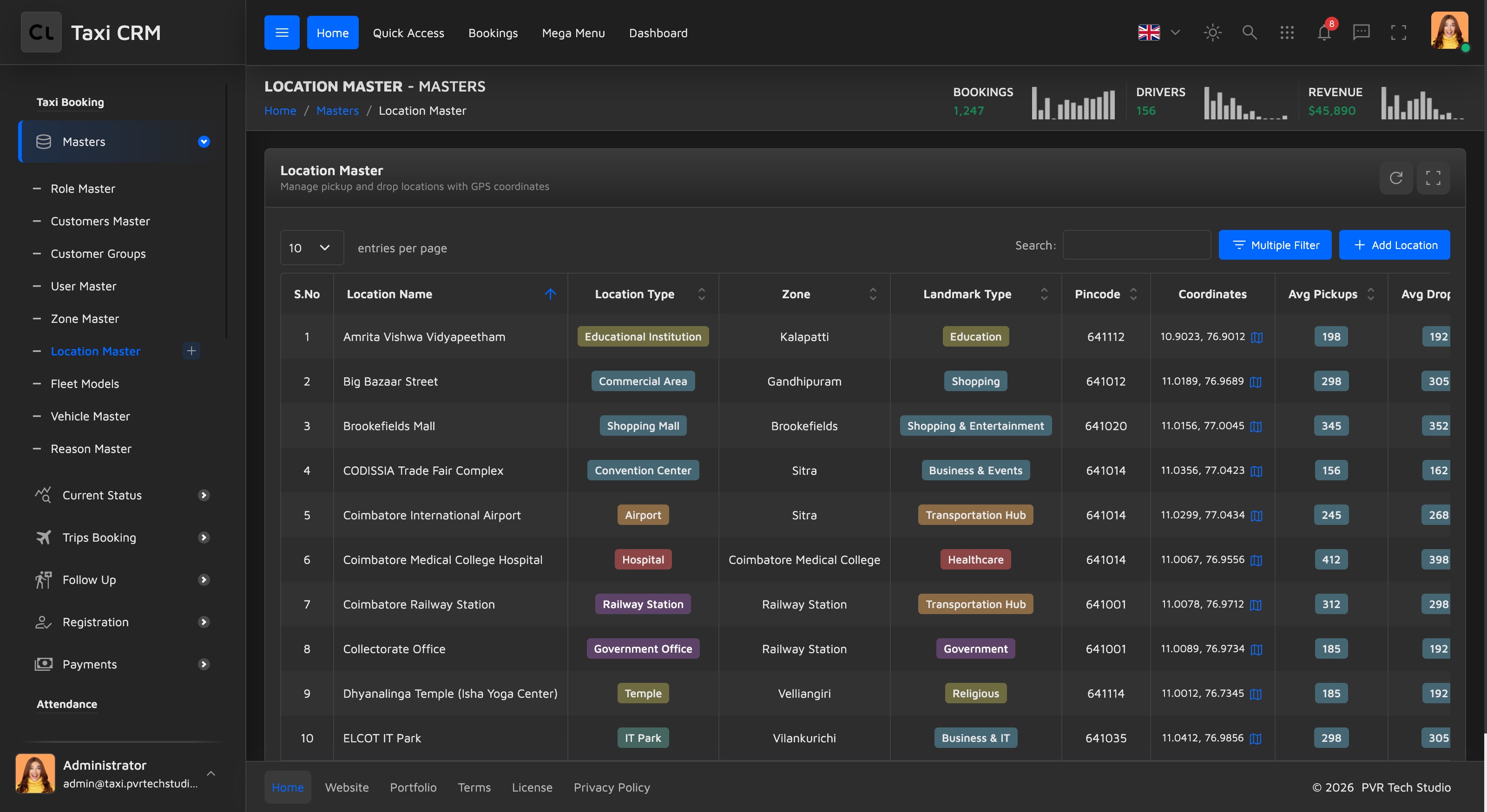
Purpose. Maintains the named pickup, drop and landmark points (airports, railway stations, malls, IT parks, hospitals…) used when creating bookings. Each location carries GPS coordinates and demand metrics.
Users. Dispatch / operations admins who curate the location catalogue.
Key columns. S.No, Location Name, Location Type, Zone, Landmark Type, Pincode,
Coordinates, Avg Pickups, Avg Drops, Popular Time, Status, Action. The Location Name column
is text-searchable (apply_search); Location Type, Zone, Landmark Type and Status get
per-column select filters (apply_select).
Add/edit form (addLocationMaster.html). Grouped into three sections:
- Location Information — Location Name, Location Type (Airport, Railway Station, Bus Stand, Shopping Mall, Hospital, Educational Institution, IT Park, Temple, Residential Area, Government Office), Status, Zone, Landmark Type (Transportation Hub, Shopping, Healthcare, Education, Technology, Religious, Recreation, Government, Residential), Pincode.
- GPS Coordinates — Latitude (-90 to 90), Longitude (-180 to 180), six-decimal precision.
- Trip Metrics — Avg Pickups/Day, Avg Drops/Day, Popular Time (free text, e.g.
08:00-18:00).
Customize. The Location Type, Zone and Landmark Type option lists are hardcoded in the
page markup and tuned to the demo city (Coimbatore zones). Replace them with your own service
area, or
populate them from the API. Cross-link: locations feed the booking flow in
Bookings.
Zone Master (zoneMaster.html)
Purpose. Defines the operational service areas used for dispatch and zone-based pricing. Each zone has a coverage area, a center coordinate, a fare multiplier and operational stats.
Users. Operations managers who plan coverage and set zone surcharges.
Key columns. S.No, Zone Name, Zone Type, Coverage Area, Center, Fare (multiplier), Vehicles
(active), Avg Trips, Status, Action. Zone Name is searchable; Zone Type and Status have
select filters.
Add/edit form (addZoneMaster.html). Three sections:
- Zone Information — Zone Name, Zone Type (Residential, Commercial, Industrial, Mixed, IT
Hub, Educational, Healthcare, Shopping District, Airport Zone, Transit Hub, Rural, Intercity),
Status, Coverage Area (free text, e.g.
15.2 km²), Fare Multiplier (1.0–3.0, step 0.1), Est. Population. - GPS Coordinates — Center Latitude, Center Longitude.
- Operational Data — Active Vehicles, Avg Trips/Day, Peak Hours (free text, e.g.
08:00-10:00, 18:00-20:00).
Customize. The Fare Multiplier is the key pricing lever here — it scales the base tariff per zone. The Zone Type list and the demo population/coverage values are placeholders; swap in your real zones. Zones are also referenced by Location Master, so keep the two lists in sync.
Reasons Master (reasonsMaster.html)
Purpose. Central catalogue of the reason codes shown throughout the app — cancellation reasons, feedback reasons, follow-up and reopen reasons. Each reason has a type, severity, category and a Material Symbols icon.
Users. Admins who standardise the reason picklists agents and the app use.
Key columns. S.No, Type, Reason, Description, Severity, Category, Icon, Status, Action.
Reason and Description are searchable; Type, Severity, Category and Status have
select filters.
Add/edit form (addReasonsMaster.html). Three sections:
- Basic Information — Type (Breakdown, Cancellation, Negative Feedback, Positive Feedback, Followup, Reopen), Reason, Description (textarea).
- Classification — Severity (Low, Medium, High, Critical), Category (Customer Initiated, Driver Issue, Vehicle Issue, Safety Issue, Service Quality, Billing Issue, Communication Issue, System Issue, Status Update, External Factors, Miscellaneous), Status.
- Icon — a free-text Material Symbol Icon name (e.g.
person_cancel,phone_missed,warning); the hint links to the Material Symbols gallery.
Customize. The Type, Severity and Category option lists drive how reasons surface elsewhere — edit them to match your operational taxonomy. Severity values map naturally to the kit's pale-palette badges; reuse those classes rather than adding colors.
Tariff Management (tariff.html)
Purpose. Defines the fare structures used to price trips — base fare, per-km rate, time/peak surcharges, taxes and validity windows, per vehicle type. This is the pricing engine's input.
Users. Finance / pricing admins who set and version fare cards.
Key columns. A leading control column, # (index), Tariff Code, Tariff Name, Vehicle Type, Base KM, Base Fare, Per KM Rate, Status, Action. Tariff Code, Tariff Name, Base KM, Base Fare and Per KM Rate are searchable; Vehicle Type and Status have select filters. (Note this page's breadcrumb subtitle is "Registration", not "Masters".)
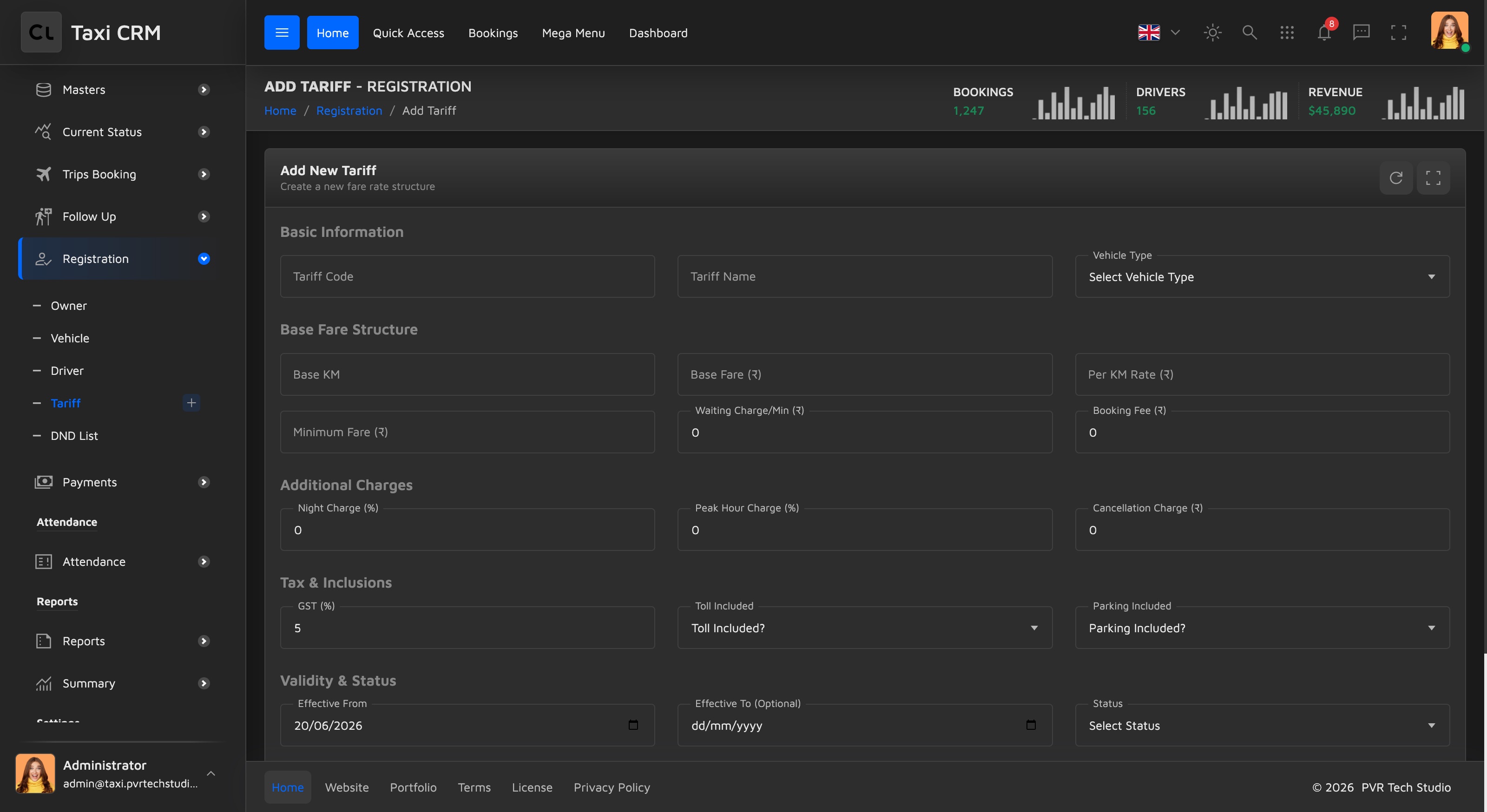
Add/edit form (addTariff.html). The most detailed master form — five sections:
- Basic Information — Tariff Code, Tariff Name, Vehicle Type (Sedan, SUV, Hatchback, MUV, Tempo Traveller, Luxury, Auto).
- Base Fare Structure — Base KM, Base Fare (₹), Per KM Rate (₹), Minimum Fare (₹), Waiting Charge/Min (₹), Booking Fee (₹).
- Additional Charges — Night Charge (%), Peak Hour Charge (%), Cancellation Charge (₹).
- Tax & Inclusions — GST (%), Toll Included (Yes/No), Parking Included (Yes/No).
- Validity & Status — Effective From (date, required), Effective To (date, optional), Status (Active, Inactive, Pending), Remarks (textarea).
Customize. The currency symbol (₹) and GST framing are India-specific — change the labels and the Vehicle Type list for your market. The Effective From / To dates let you version tariffs over time, and zone-level pricing comes from the Zone Master fare multiplier, so the two work together. Cancellation reasons are sourced from the Reasons Master; cancellation charges are set here.
Reusing these pages
To add another master list, copy one of the list pages (e.g. locationMaster.html) plus its
add*.html form, rename them in camelCase, point the sidebar and page-header currentPage at
the new file, and add a matching script under assets/js/pages/masters/ and a JSON locale file
under assets/locales/en/ (one per page). See i18n for the locale naming
rule and Forms for the form-floating / select2 field patterns used
throughout these forms.
Was this page helpful?