
Owners
The Registration pages for vehicle owners and fare tariffs — the owner registry and add/edit form, plus tariff management and the add/edit tariff form.
The Owners area lives under the sidebar Registration group and manages the people and
companies that own the vehicles your fleet operates — individual partners, companies,
partnerships and fleet owners — together with the fare tariffs that price each trip. It is
built from two classic master patterns: an owner listing page (owner.html) and its registration
form (addOwner.html), plus a tariff listing page (tariff.html) and its add/edit form
(addTariff.html). All four pages use the shared card panels and a responsive Bootstrap grid, so
they match the rest of the master pages — see Masters and
Layout.
Owners (owner.html)
Purpose. A searchable, filterable registry of every vehicle owner. The page header carries the subtitle Vehicle Owner Registration, and the main card panel (Owner Registration) wraps a single Bootstrap DataTable.
Users. Fleet administrators and back-office staff who onboard owners and keep their records current.
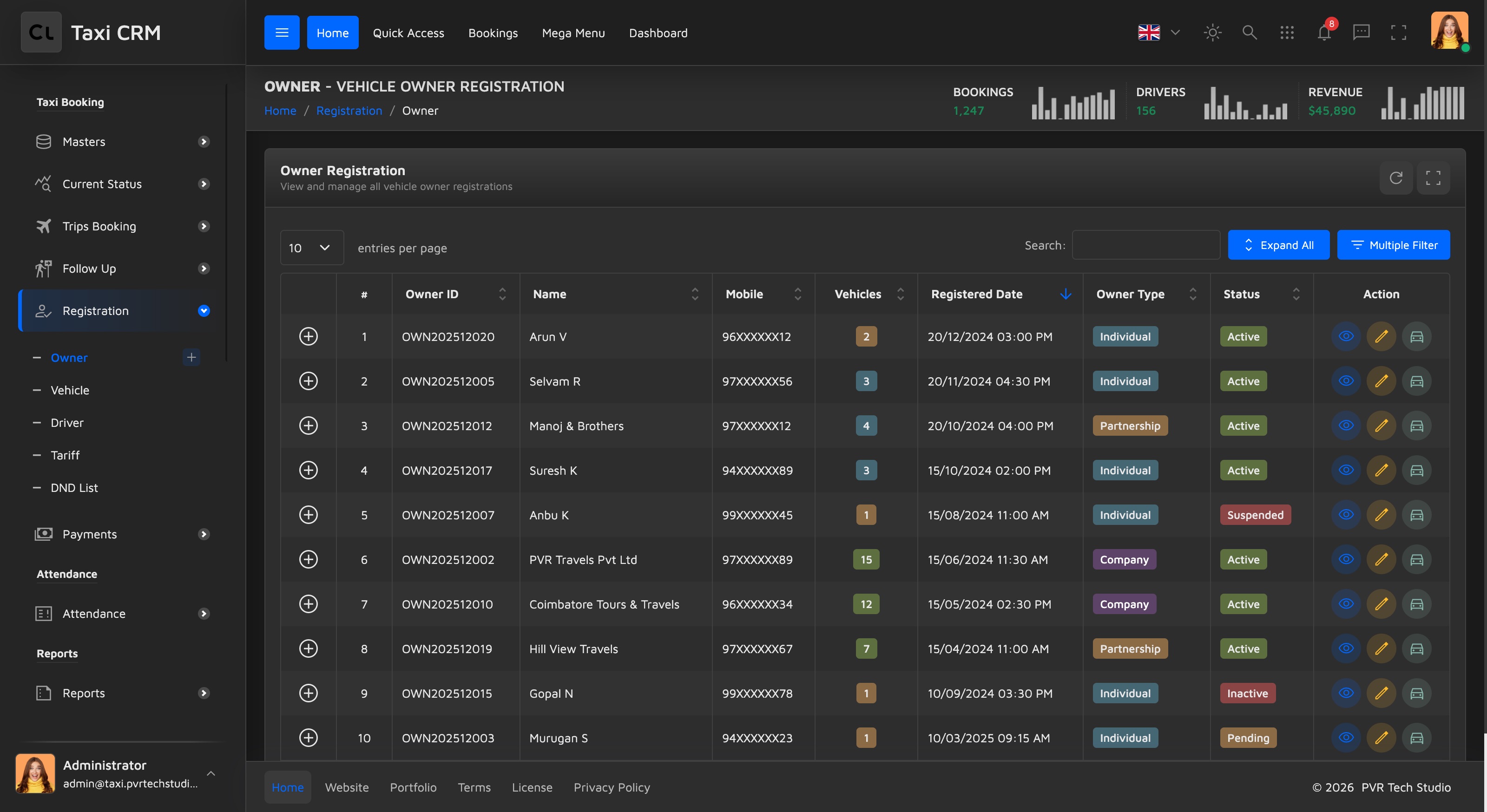
Key columns. The table (table#initDataTable) declares these headers, each driven by an
owner.* i18n key:
| Column | Notes |
|---|---|
| (checkbox / control) | First blank column for row selection |
# | Row index |
| Owner ID | Searchable (apply_search) |
| Name | Searchable |
| Mobile | Searchable |
| Vehicles | Count of vehicles linked to the owner; searchable |
| Registered Date | Searchable, left-aligned |
| Owner Type | Filtered via a select dropdown (apply_select) |
| Status | Filtered via a select dropdown (apply_select) |
| Action | Row actions (edit / view, etc.) |
Search & filter. Columns marked apply_search feed the per-column text search; columns
marked apply_select render dropdown filters. A hidden advanced-filter panel
(#show_multiple_filter_div, an Owner Search card panel) is present in the markup but
collapsed by default — toggle it to expose multi-criteria filtering. The table itself is wired up
in assets/js/pages/masters/owner.js.
Customize. Add or remove a column by editing both the thead in owner.html and the matching
column definition in owner.js, then add the column label to owner.json. To change which
columns are searchable vs. dropdown-filtered, swap the apply_search / apply_select classes.
Add / Edit Owner (addOwner.html)
Purpose. The full owner registration form. The same page serves both add and edit
(prefilled) — its card panel is titled Add New Owner. On submit, the form
(form#addOwnerForm) is handled by assets/js/pages/masters/addOwner.js.
Users. Staff onboarding a new owner/partner or updating an existing owner's contact, banking or agreement details.
Fields. The form is grouped into five labelled sections, each a .form-floating grid built
with Bootstrap rows and columns:
| Section | Fields |
|---|---|
| Personal Information | Owner Name, Email Address, Owner Type (Individual / Company / Partnership / Fleet Owner), Mobile Number, Aadhaar Number, PAN Number |
| Address Information | Address (textarea), City, State, Pincode |
| Bank Details | Bank Name, Account Number, IFSC Code, GST Number, Status (Active / Inactive / Pending) |
| Agreement Details | Commission Rate (%), Payment Terms (Weekly / Bi-Weekly / Monthly), Agreement Date, Agreement Expiry, Remarks |
Owner Type, Status and Payment Terms are .select2 dropdowns; Agreement Date and Agreement
Expiry use the .datepicker class. Most fields are required; Aadhaar Number, GST Number and
Remarks are optional.
Actions. The footer row has two buttons: a red Cancel link (btn-red, returns to
owner.html) and a green Submit button (btn-green, type="submit"). Both use Material
Symbols icons (close / check).
Customize. Add a field by copying an existing .form-floating block into the right section
grid, giving the input / select a unique id + name, and adding its label key to
addOwner.json. For dropdowns, keep the .select2 class and add option values; for dates,
keep .datepicker. Handle the new field's value in addOwner.js. Follow the
form element conventions rather than hand-rolling new input styles.
Tariff (tariff.html)
Purpose. A searchable register of fare tariffs — the pricing rules that drive how a trip is
charged, keyed by vehicle type. The page header subtitle is Registration and the main card
panel (Tariff Management) wraps a single DataTable (#initDataTable).
Users. Pricing/operations administrators who maintain fare structures.
Key columns. The table declares: control, # index, Tariff Code, Tariff Name, Vehicle Type,
Base KM, Base Fare, Per KM Rate, Status, Action. Tariff Code, Tariff Name, Base KM, Base Fare and
Per KM Rate are text-searchable (apply_search); Vehicle Type and Status are dropdown-filtered
(apply_select). A hidden Tariff Search panel (#show_multiple_filter_div) provides
multi-criteria filtering. The table is wired in assets/js/pages/masters/tariff.js.
Customize. Edit the thead in tariff.html and the matching column definitions in
tariff.js. Swap the apply_search / apply_select classes to change which columns get a search
box vs. a dropdown filter. See Tables.
Add / Edit Tariff (addTariff.html)
Purpose. The full tariff form — the add/edit page for tariff.html, titled Add New Tariff.
It captures a complete fare rate structure for a vehicle type. On submit, the form
(form#addTariffForm) is handled by assets/js/pages/masters/addTariff.js.
Users. Pricing administrators creating or editing a fare rate structure.
Fields. The form is grouped into five labelled sections, each a .form-floating grid:
| Section | Fields |
|---|---|
| Basic Information | Tariff Code, Tariff Name, Vehicle Type (Sedan / SUV / Hatchback / MUV / Tempo Traveller / Luxury / Auto) |
| Base Fare Structure | Base KM, Base Fare (₹), Per KM Rate (₹), Minimum Fare (₹), Waiting Charge/Min (₹), Booking Fee (₹) |
| Additional Charges | Night Charge (%), Peak Hour Charge (%), Cancellation Charge (₹) |
| Tax & Inclusions | GST (%), Toll Included (Yes / No), Parking Included (Yes / No) |
| Validity & Status | Effective From, Effective To (optional), Status (Active / Inactive / Pending), Remarks (textarea) |
Vehicle Type, Toll Included, Parking Included and Status are .select2 dropdowns; Effective From
and Effective To are type="date" inputs. The footer has a red Cancel link (btn-red, returns
to tariff.html) and a green Submit button (btn-green).
Customize. Add a field by copying a .form-floating block into the right section, giving the
control a unique id + name; the Vehicle Type / status option lists are hard-coded in the
select elements, so edit addTariff.html to change them. Handle the new field in addTariff.js.
See Forms.
All four pages are standard masters. For shared table behaviour (paging, export, per-column filters) see Data Tables; for select / datepicker / floating-label inputs see Forms.
Was this page helpful?