
Customers & CRM
The customer database, segmentation, enquiry/follow-up/complaint workflows, DND list, chat and activity feed that make up the Customers & CRM area of Taxi CRM 2026.
The Customers & CRM area covers everything about the people who book rides: the master customer database and its segments, the inbound enquiry → follow-up → feedback workflow, the Do-Not-Disturb blocklist, the in-app chat, and a system-wide activity feed.
Most pages follow the same two-part pattern used across the template: a list page built on a
DataTable inside a card panel, with a hidden multi-criteria filter panel
(#show_multiple_filter_div) toggled from the page header, paired with an add/edit form page
using Bootstrap form-floating fields. See Tables for the DataTable
setup and Forms for the form controls.
Pages documented here: Customer Master, Customer Groups, Top Customers, Customers Report, Enquiries, Follow-Ups, Feedback & Complaints, DND List, Chat and News Feed.
Customer Master (customerMaster.html)
The central customer database. Lists every registered customer and links to the add/edit form.
- Users: operators and admins managing customer records.
- Table columns: S.No, Name, Mobile, Email, Wallet, VIP, Status, Reg Mode (App / CRM /
Manual), Action. Name/Mobile/Email use free-text column search (
.apply_search); VIP, Status and Reg Mode use dropdown column filters (.apply_select). - Filter panel: "Customer Search" panel (hidden by default) for filtering by multiple
criteria; columns are appended into
.row#append_col. - Script:
assets/js/pages/masters/customerMaster.js.
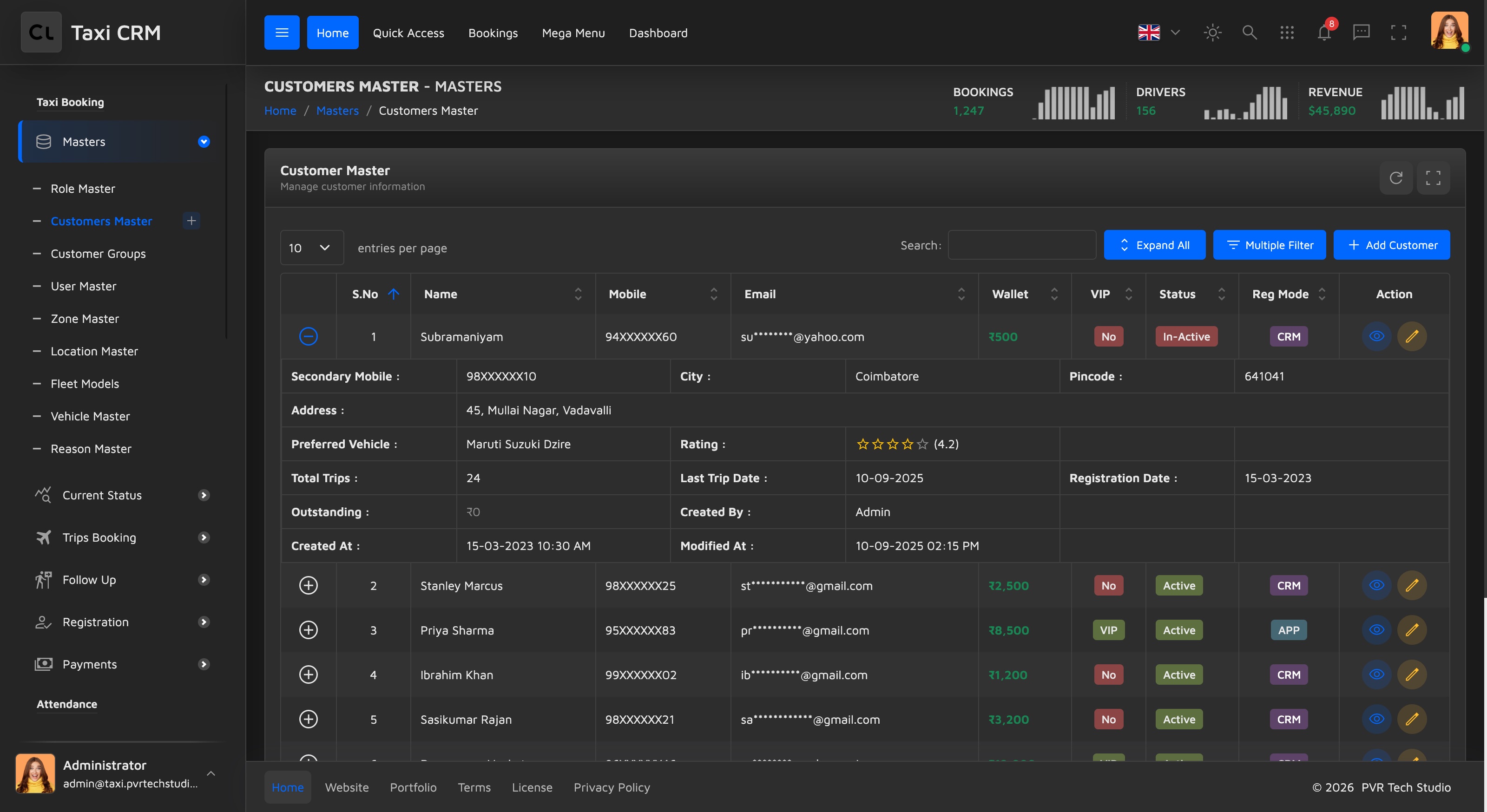
Customize: edit columns in customerMaster.html; wire the table data and row actions in
the page script. Add or remove .apply_search / .apply_select classes on a th to change
which columns get a search box vs. a dropdown filter.
Add Customer (addCustomerMaster.html)
The create/edit form for a customer, grouped into three sections:
| Section | Fields |
|---|---|
| Personal Information | Customer Name, Email Address, VIP Status, Primary Mobile, Secondary Mobile, Status |
| Address Information | Address, City, Pincode, Preferred Vehicle |
| Wallet Information | Wallet Balance, Outstanding Amount, Registration Mode (App / CRM / Manual) |
Cancel returns to customerMaster.html; Submit posts the form (#addCustomerForm). VIP, Status,
Preferred Vehicle and Registration Mode are select2 dropdowns. Scripts:
assets/js/pages/shared/data.js and assets/js/pages/masters/addCustomerMaster.js.
Customer Groups (customerGroups.html)
Segments customers into named, colour-coded groups (for example Corporate, VIP, Walk-in) used for targeted pricing and communication.
- Table columns: S.No, Type, Color, Status, Action. Type is text-searchable; Status is a dropdown filter.
- Script:
assets/js/pages/masters/customerGroups.js.
Add Customer Group (addCustomerGroups.html)
Short form (#addCustomerTypeForm) with Type Name, Type Color, Status and an optional
Description. The colour field uses the Coloris colour picker (data-coloris,
assets/plugins/coloris/) — the chosen colour is what drives the group's swatch in the list.
Customize: the colour swatch palette is free-form via Coloris; if you want to constrain it to the kit's pale palette, see the colour variables in CSS System.
Top Customers (topCustomers.html)
A ranking report of the highest-value customers by collection. Lives under the Reports group.
- Table columns: S.No, UID, Name, Mobile, Last Week Collection, Last Month Collection, Total
Collection (collection columns are right-aligned with
.text-end). - Filter panel: generic "Filter Options" panel for narrowing the ranking.
- Script:
assets/js/pages/reports/topCustomers.js.
This is a read-only report — there is no add/edit page. Related: Reports.
Customers Report (customersReport.html)
A per-booking customer activity report. Lists each customer's bookings with route and amount.
- Table columns: #, PNR, Customer, Phone, From, To, Date, Amount (right-aligned), Status.
- Filter panel: "Customer Booking Search" for filtering bookings by date range.
- Script:
assets/js/pages/reports/customersReport.js.
Read-only report, no add/edit page. See Reports for the shared report layout and export controls.
The first three pages below — Enquiries, Follow-Ups and Feedback & Complaints — sit in the sidebar
Follow Up group, alongside Cancelled Trips (cancelledTrips.html). Cancelled Trips is a
trip-management list (PNR, Name, From, To, Pickup Time, Cancel Reason, Vehicle Type) driven by
assets/js/pages/bookings/cancelledTrips.js — it is documented with the booking flow under
Trips & Dispatch.
Enquiries (enquiries.html)
Tracks inbound booking enquiries so they can be responded to and converted into trips.
- Table columns: #, Enquiry ID, Name, Mobile, From, To, Enquiry Time, Status, Action.
- Filter panel: "Enquiries Search" for multi-criteria filtering.
- Script:
assets/js/pages/crm/enquiries.js.
Customize: the Action column is where you wire convert-to-booking / respond handlers in the page script. Status is a dropdown column filter.
Follow-Ups (followUp.html)
Reminders and follow-up tasks tied to enquiries and bookings.
- Table columns: #, Follow Up ID, Name, Mobile, Subject, Follow Up Date, Priority, Status, Action. Priority and Status are dropdown filters.
- Script:
assets/js/pages/crm/followUp.js.
Feedback & Complaints (feedbackComplaint.html)
A ticketing list for customer feedback and complaints, used to track and resolve service issues.
- Table columns: #, Ticket ID, Name, Mobile, Type, Subject, Created Date, Priority, Status, Action. Type, Priority and Status are dropdown filters.
- Script:
assets/js/pages/crm/feedbackComplaint.js.
Customize: Type, Priority and Status values come from the page script's data — adjust them
there and the matching .apply_select dropdowns repopulate automatically. Use the kit's badge
classes for status pills (see CSS System).
DND List (dndList.html)
The Do-Not-Disturb blocklist: numbers and contacts restricted from system communication or booking (spam, fraud, blacklisted customers, etc.). Lives under the Registration group.
- Table columns: #, Mobile Number, Name, Type, Reason, Blocked Date, Status, Action. Type, Reason and Status are dropdown filters.
- Filter panel: "DND Search" for multi-criteria filtering.
- Script:
assets/js/pages/masters/dndList.js.
Add to DND List (addDndList.html)
The form (#addDndListForm) to block a contact, grouped into:
| Section | Fields |
|---|---|
| Contact Information | Mobile Number, Name, Email Address |
| Block Details | Type (Customer / Driver / Vendor / Spam / Other), Reason (Fraud / Abusive / Non-Payment / Repeated Cancellation / Blacklisted / Customer Request / Spam Calls), Status (Active / Temporary / Permanent) |
| Duration | Blocked Date, Expiry Date (optional), Outstanding Amount |
| Address Information | Address, City |
| Remarks | Remarks / Reason for Blocking (required) |
Customize: the Type, Reason and Status option lists are hard-coded in the select
elements — edit addDndList.html to change them, keeping the list page's .apply_select
filters in sync.
Chat (chatWidget.html)
A full-page view of the in-app chat / messaging interface. The page itself is minimal — it sets
data-page='chatWidget' and renders the shared chat offcanvas component, which is the same chat
panel available site-wide from the header. It provides a conversation list and message thread UI
for talking to customers or drivers.
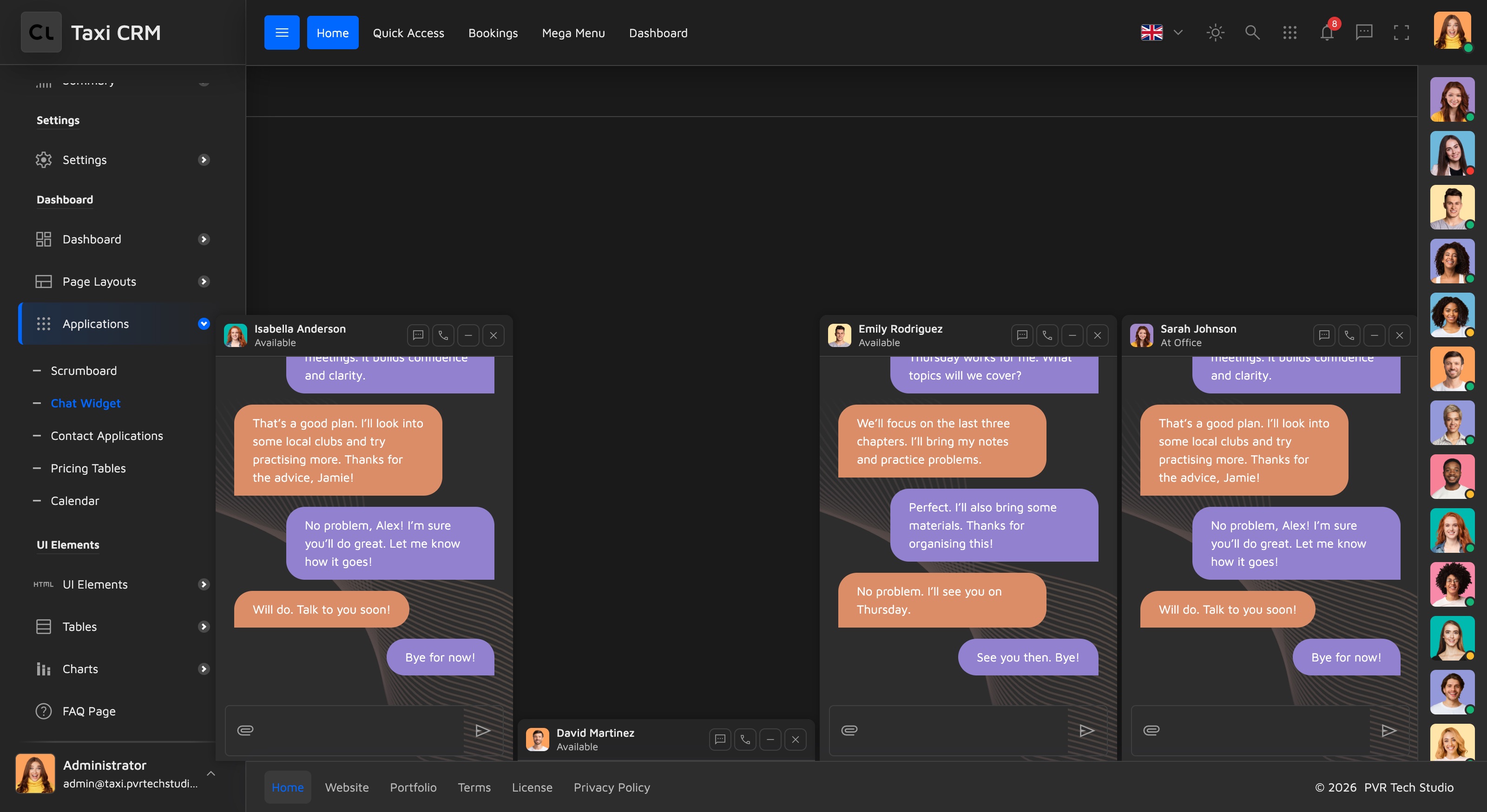
Customize: the chat panel markup is shared across pages, so editing it updates everywhere the
chat appears — edit it wherever it occurs in the page markup. Wire real messages in the
corresponding page script under assets/js/pages/.
News Feed (newsFeeds.html)
A system-wide activity feed / timeline of operational events — bookings created, vehicles assigned, trips completed or cancelled, payments, registrations and more.
- Header controls: tab filter buttons (Bookings / Vehicles / Drivers, each
data-feed-tab="..."with a count badge), a search box, and a date-range dropdown (Last 30 Days / Last 7 Days / Today / Yesterday). - Timeline: grouped into dated sections (
.timeline-section→.timeline-date-header), each containing.timeline-itemrows with a time, a coloured event icon (.timeline-icon.icon-success/icon-error/icon-warning/icon-info/icon-orange/icon-default), avatar, descriptive text and status badges. Some items carry an expandable message block (.timeline-message) or a collapsed "+ N activities" group. - Script:
assets/js/pages/ui/newsFeeds.js.
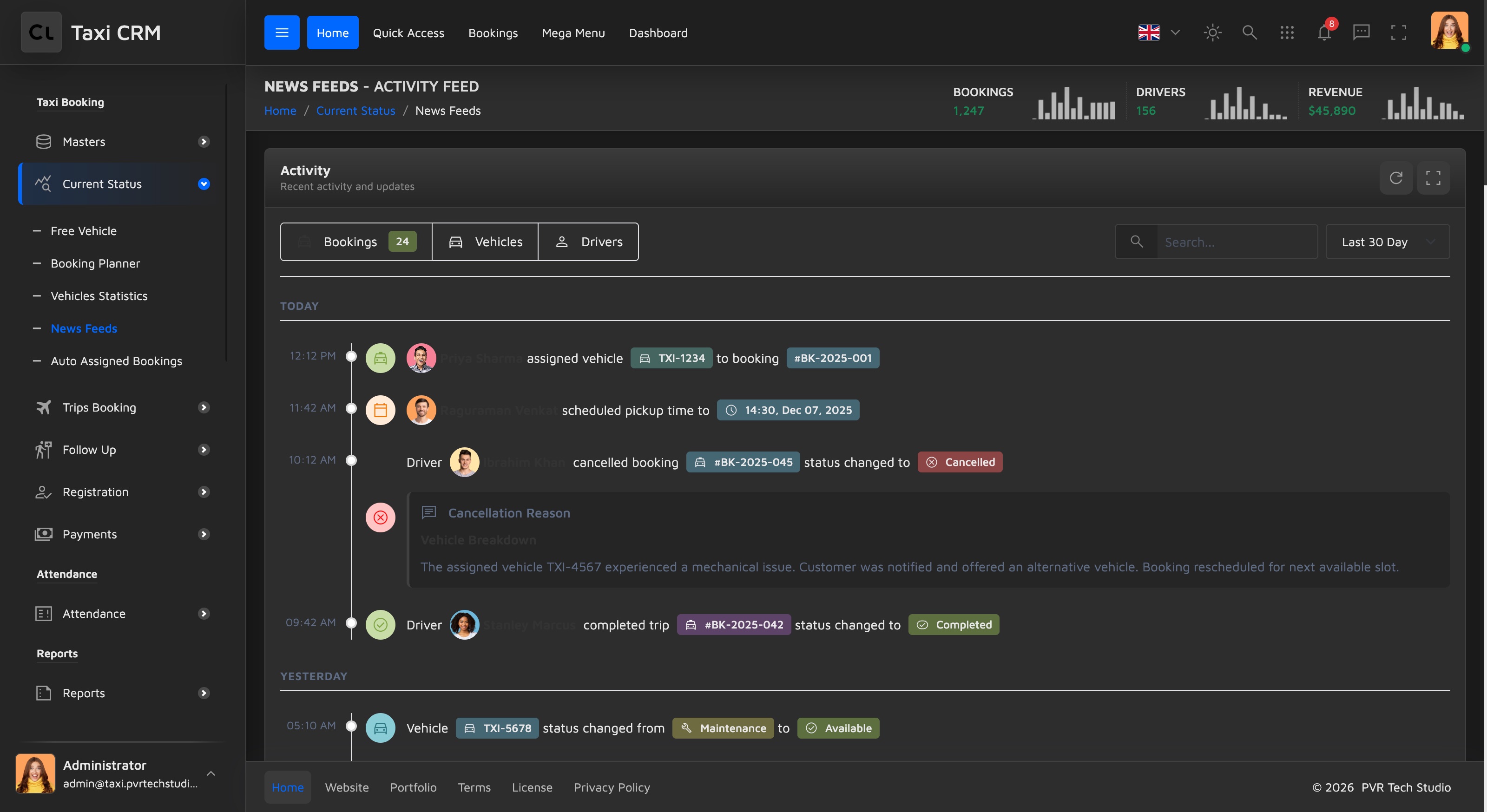
Customize: the demo timeline is static markup; render items from data in the page script. Event-icon colours and badges use the kit's pale palette — reuse those classes rather than adding new colours (see CSS System). The feed shares the timeline pattern with the Widgets gallery's timeline widget.
Was this page helpful?