
Dashboard
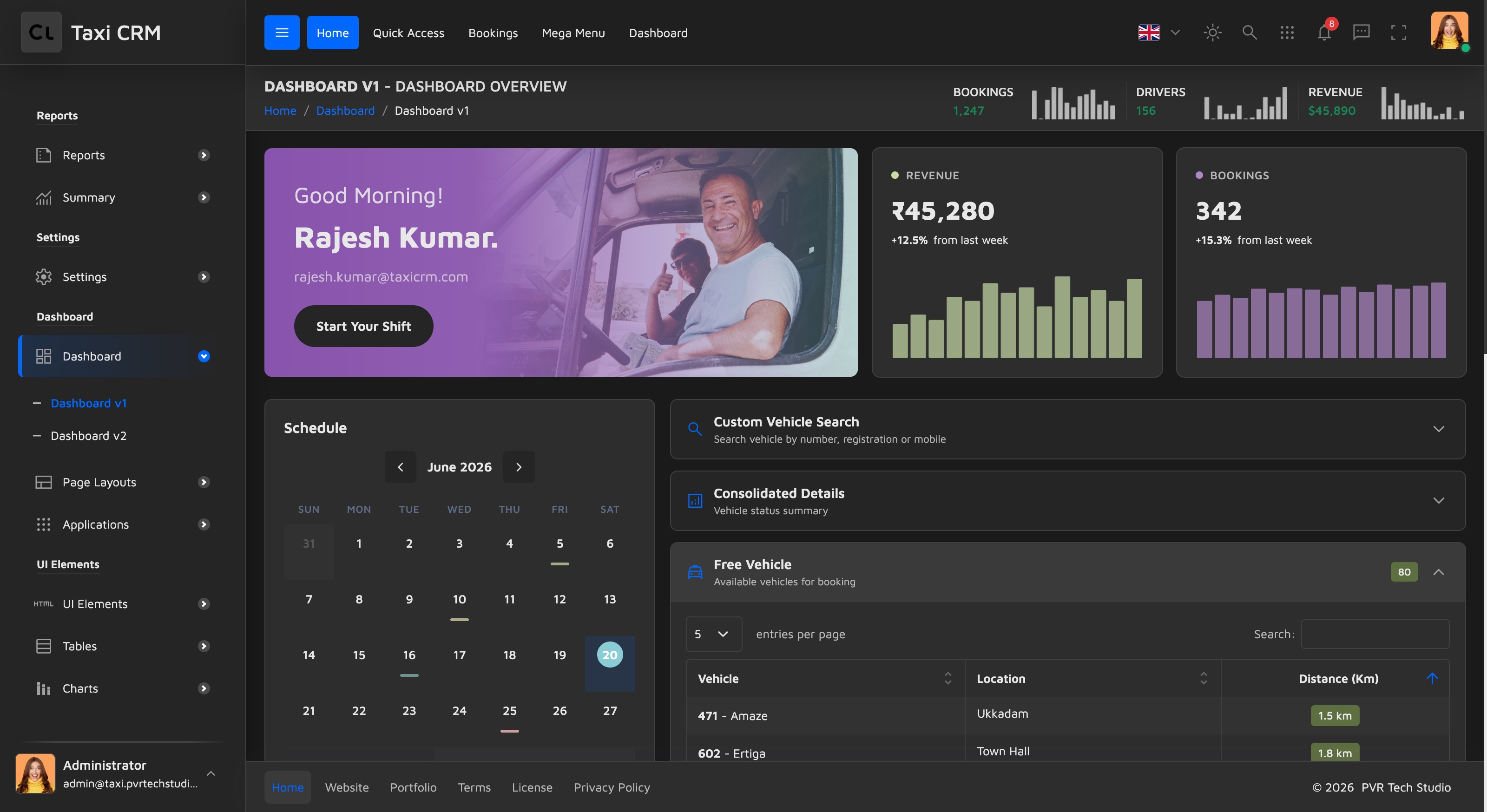
The Taxi CRM 2026 operations dashboard — KPIs, schedule, live bookings, fleet status and analytics — and the two layout variants that ship.
2 min read
Updated June 21, 2026
The Dashboard is the operator's home screen — a single view of bookings, drivers, revenue and fleet health. Two variants ship with the kit:
- Dashboard v1 —
dashboard.html(the default landing page) - Dashboard v2 —
dashboardV2.html(an alternate layout)
↗ Dashboard v1 live demo · Dashboard v2 live demo
What's on the dashboard
Dashboard v1 is assembled from the kit's widgetStatsCard* mixins. Reading top to bottom:
| Section | Widget | What it shows |
|---|---|---|
| Welcome card | widgetStatsCard17 | Greeting, signed-in driver/operator and a Start Your Shift action |
| Revenue / Bookings cards | widgetStatsCard13 | This-week totals (₹45,280 · 342) with a week-over-week delta and a mini chart |
| Schedule | widgetStatsCard18 | Mini month calendar with booking events |
| Today's Timeline | widgetStatsCard8 | Chronological feed of assignments, pickups, cancellations and completions |
| Recent Bookings | widgetStatsCard9 | Latest trips with customer, location and fare |
| Custom Vehicle Search / Free Vehicle | vehicleAccordion | Collapsible vehicle-availability accordion (the same one used on bookingV1) |
| Trip Analytics | widgetStatsCard15 | Total / Completed / In-progress / Cancelled doughnut breakdown |
| Fleet Status | widgetStatsCard15 | Total / Active / On-trip / Inactive vehicles doughnut |
| Top Drivers | widgetStatsCard9 | Leaderboard by trips with ratings (links to driver.html) |
| Active Customers | widgetStatsCard9 | Most active customers by trip count (links to customerMaster.html) |
Building from the dashboard
The dashboard is assembled entirely from widgets arranged with rows and columns. To build your own variant:
- Start from
dashboard.html(v1) ordashboardV2.html(v2). - Remove the widget cards you don't need — each is an independent
widgetStatsCard*mixin. - Add widgets from
widgets.htmlfor the metrics you do need. - Wire the counters, tables and charts to your data. The demo renders charts with Chart.js
and the calendar with FullCalendar, initialised from
assets/js/pages/ui/widgets.js— see JavaScript Helpers and Charts.
All labels on the dashboard are translatable via
data-i18nattributes — see Internationalization.
Was this page helpful?